A high-level overview of AIC and PingIDM’s Organizations
Table of Contents
- Introduction
- Object Modeling Definitions
- What is the Organization Model?
- Utilizing the Organization Model
- Referencing the Organization Model in the Platform
- Extending the Organization Model
- Conclusion
Introduction
PingOne Advanced Identity Cloud (AIC) and PingIDM (Ping’s self-managed Identity Management) provide a powerful model called Organizations which enables out-of-the-box extensible, inherited relationships between users and associated groups of users. In short, Organizations give you the ability to match your IAM strategy to your business strategy, and not the other way around - they are a means to unify, simplify, and standardize your process across your internal, external, and partner identities.
Considering its flexibility and scalability, starting with an empty tenant and the base Organization model can feel a bit daunting.
This Guide intends to teach you the key information you need to know when interacting with AIC/PingIDM’s Organization model. It is split into the following sections:
- Object Modeling Definitions
- What is the Organization Model
- Utilizing the Organization Model
- Referencing the Organization Model in the Platform
- Extending the Organization Model
By the end of this Guide you’ll have a medium-level understanding of Organizations and how they operate generically within AIC and PingIDM.
This Guide expects a beginner level of familiarity with AIC or PingIDM. Certain topics covered here will be specific to the AIC platform: when this happens, we’ll call it out. If you do have a tenant or deployment available, feel free to follow along however it is not necessary.
Object Modeling Definitions
Before we define Organizations, we need to understand the underlying infrastructure that surrounds it. Let’s start broadly and then narrow down as we go.
The Organization model is a part of Identity Management (IDM). PingIDM is the self-deployed instance and is a core feature set within AIC. Identity Management’s job is to represent, control, connect, and map identity data in and out of the Ping platform. Regarding Organizations, we care most about representing and controlling its data - what does the template look like, and ensuring that the data within it is managed appropriately (think CRUDPAQ - Create, Read, Update, Delete, Patch, Action, Query).
Managed Objects are a templatized instance of data in IDM that contains Properties. In essence, they are the representation of identities within IDM. By default, your instance comes with Users, Roles, Assignments, Groups, and Organizations, but you can create as many as you’d like. Managed Objects store data within a Directory, with each Managed Object being categorized separately.
Properties (sometimes called Attributes) are the individual data fields within a Managed Object that represent the data types stored within that object. They define the specific pieces of information each instance of that Managed Object will hold. As an example, a User is a Managed Object, and their Username is one of their Properties. Properties can be booleans, numbers, arrays (called multivalues), objects (including nested objects), strings, Relationships, and Virtual Properties. You can also create custom types as needed. Properties have their own unique indexing1, validation, hashing or encryption, and triggers which can be performed on actions such as validating, retrieving, or storing an instance of this Property.
Relationships are a type of Property that creates a linkage between instances of Managed Objects. Relationships can be one-to-one, one-to-many, many-to-one, and many-to-many, and can be linked to different Managed Objects or the same Managed Object. Common examples of relationships include Manager to Employees, Parent to Children, or Department to Teams. Relationships can contain their own data within the link itself, can return their data alongside either end of the link in a query, and can be used as a means to notify the connected Managed Objects that changes have occurred on opposite ends of the link (Relationship-Derived Virtual Property).
Virtual Properties are a powerful Property type that can dynamically calculate its own data on the fly, either on time of retrieval or based on notifications received from a Relationship tied to this Managed Object (Relationship-Derived Virtual Property). This significantly simplifies data and queries as well as improves performance because the complex calculations are handled for you dynamically at run time or statically at storage time - for example, you could have a virtual property that dynamically returns the “Full Name” of a User as a combination of their First and Last name without actually having to store and update that value separately.
Relationship-Derived Virtual Properties (RDVPs) are a type of Virtual Property that update based on notifications from the Relationships linked to its Managed Object. An RDVP has access to content from the Object’s Relationships and can travel the chain of relationships to create a composite value of the chain. Relationships and RDVPs are the two components of IDM that make Organizations so flexible and capable.
What’s the Deal with RDVPs?
RDVPs are an insanely powerful tool for reducing complexity and increasing performance.
As an example, let’s say that you have a business structure of Managers to Employees like we mentioned in the Relationships section. In most companies, you’re not going to have one layer of Managers - you’ll probably have at least 3 and each of those layers may have tens to hundreds of Managers who then manage their own number of Employees.
If I wanted to get a list of all of the Managers above an Employee, how would I go about it? Normally, it would likely be a series of queries that would look something like this:
- Get the Employee
- Find the Employee’s Manager
- Get the Manager
- Find the Manager’s Manager
- Get the Manager’s Manager
- Find the Manager’s Manager’s Manager
- …
- Manager X has no Manager, return
Think about this the other way, too. If I wanted to get all of the Employees under a Manager, and each Manager has more than one Employee, how many operations do I have to take? Now what if I had to perform this action every time I entered an application? This is starting to sound a lot like one of those classic graph traversal interview questions!
The deeper or wider you go, with the more connections you have, the more operations you would normally have to take. This makes your code complex and significantly increases the number of queries you need to make to get the data you and your users need to be successful. RDVPs solve this problem.
RDVPs travel the Relationships for you and update a static result on the object directly at time of change from anywhere in the Relationship.
If we looked at the previous example, if I wanted to get a list of the Employee’s Managers, or a list of the Manager’s Employees, the data is on the User directly. If the Employee is promoted, or switches teams, and the managerial hierarchy changes, the data on the User updates automatically.
RDVPs proactively updates relevant aggregate data so that you only have to look at one Object to understand what’s going on with everything it’s linked to.
What is the Organization Model?
Organizations are a Managed Object that contain multiple Relationships both to Users and to other Organizations. These Relationships store RDVPs that define the linkages that the Organization has with other Organizations and Users. Since Organizations are a Managed Object, they are adherent to the same scale as Users, meaning that AIC is rated for hundreds of millions of Organizations while PingIDM is hypothetically as scalable as your hardware will allow.
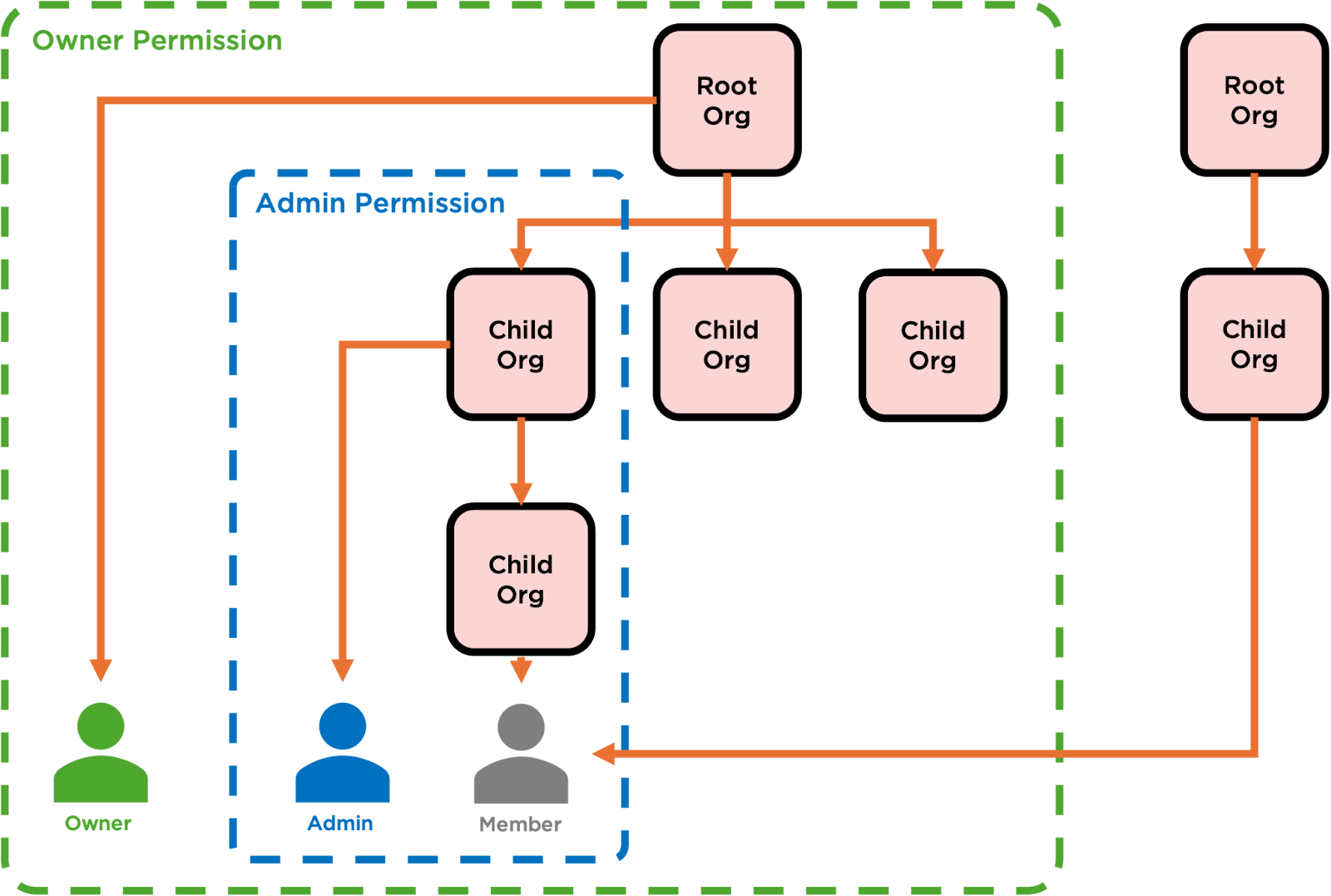
Organizations, at their core, build a hierarchy of templatized data. Due to the Relationships between Organizations and Users, this data can be inherited up and down the hierarchy.
Visualized, the Organization model often looks like a tree.

Organizations enable hierarchical, inherited data templates, allowing you to standardize and represent complex structures such as families, business partnerships, and supplier/distributor models.
But just having this data is only one part of what makes this model special. Organizations don’t just represent Parent/Child relationships between other Organizations: they also by default contain 3 different Relationship types with Users - and Users can retrieve and inherit information from the hierarchy as well. Due to the RDVPs already on the Organization, and the permission model in place on the Organization, elevated Relationship types (i.e. Owners and Admins) have the ability to manage aspects of both the Organization, its related Users, and any Organizations and Users that they’ve inherited - both via REST API and (in the case of AIC) hosted UI.

Organizations enable hierarchical, inherited delegated administration, allowing you to scale administration alongside your platform by delegating operational management of the hierarchy and its Users to the Users within the Organization (or its Parent).
Additionally, these Relationship types are many to many, meaning that a single User can be a Member, Admin, and Owner of as many different Organizations and Hierarchies as they need.
So, why Organizations?
Organizations let you:
- Templatize grouping of content so that you can build a standard that the platform adheres to
- Delegate the content so that the platform can be managed at scale without having to hire thousands of admins to keep up
- Link the content so that it and its users can inherit information and administration for quicker time-to-value
A Quick Analogy
Think of the Organization Model as a Condominium.
As the Tenant Administrator, you’re the owner of the Building itself. You dictate what services are available, how the condos are laid out, and the keycard system for how the residents get into the building. You can also add floors and rooms to the Condo at any time.
The people in your Condo (Users) could be Residents (Admins) or Staff (Owners). Everyone must use their keycard to get into the building, and that same keycard may give them access to different rooms or Condos in the building. A Resident, for example, may have access to their Condo as well as to a friend’s Condo. Staff may have access to all Condos on a given floor, and may have access to systems like plumbing and electrical which the Residents don’t interact with.
Residents can modify their Condo, but how they can change it must adhere to the rules and regulations defined by the Building. To the benefit of the Resident, ongoing maintenance of the Condo and its services are managed by the Building and not by them.
If the Resident decides to rent out their Condo, their Tenants (Members) will have access to the Building and to the Condo but won’t be able to modify the Condo at all. They can only use the facilities given to them by the Resident.
As your Building grows, you may need more staff to run it. As such, you can appoint Floor Managers (Owners of a Parent Org) who also have the ability to create new Condos and manage the Floors, Residents, and Tenants within.
Additionally, some of your Maintenance Staff and Floor Managers live in your Building. That means they are also Residents, and have different capabilities and responsibilities depending on what Condo they’re currently in.
Utilizing the Organization Model
So let’s put this all together and see how the Organization Model works in practice. Note that the platform screens shown below are taken from the built-in Hosted Pages within AIC, however each and every action is available in PingIDM via the Native UI or REST API.
Our goal today will be to create a basic business hierarchy. We’ll take the Supplier/Distributor model for this example.
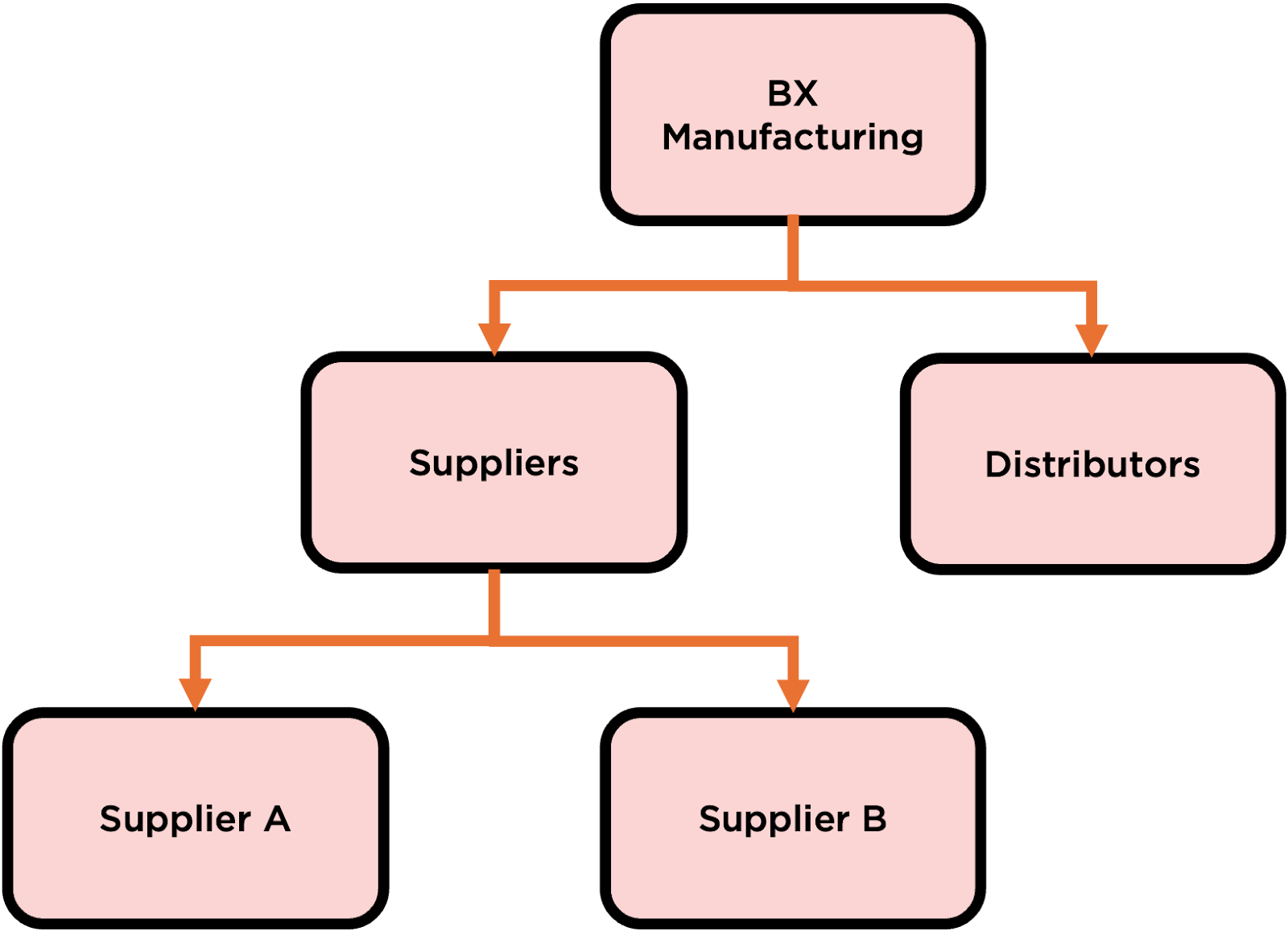
In our example we have a Manufacturing vertical named BX Manufacturing.
BX Manufacturing has partnerships with Suppliers, who provide goods and services, and Distributors, who purchase BX Manufacturing’s products to then be sold elsewhere. Both Suppliers and Distributors need to give their employees access to BX Manufacturing’s systems but what they ultimately do with those systems is very different.
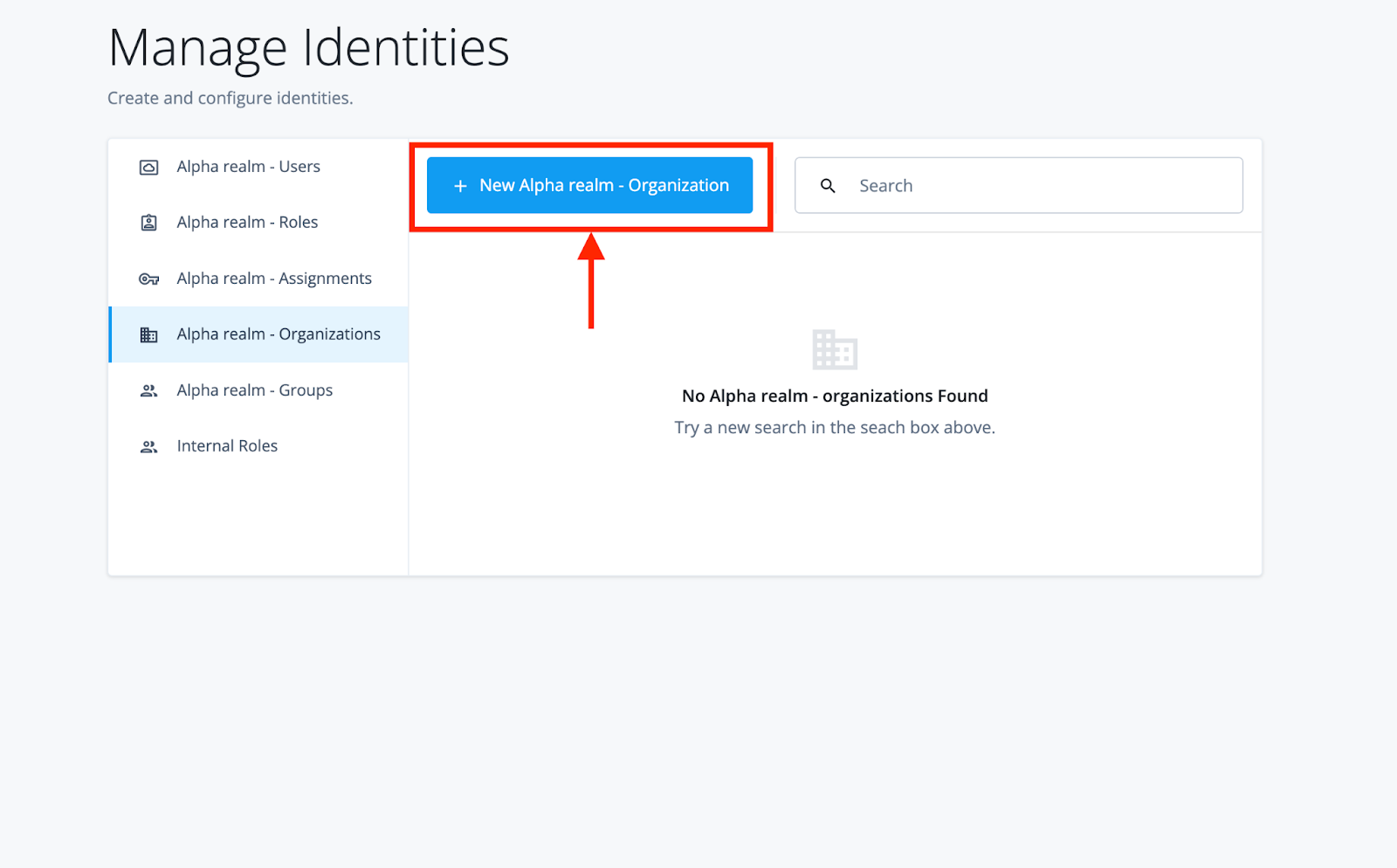
To start, let’s create the Root Organization. As the Tenant Admin, we can select “New Organization”, enter in the Name, and then we’re ready to go.

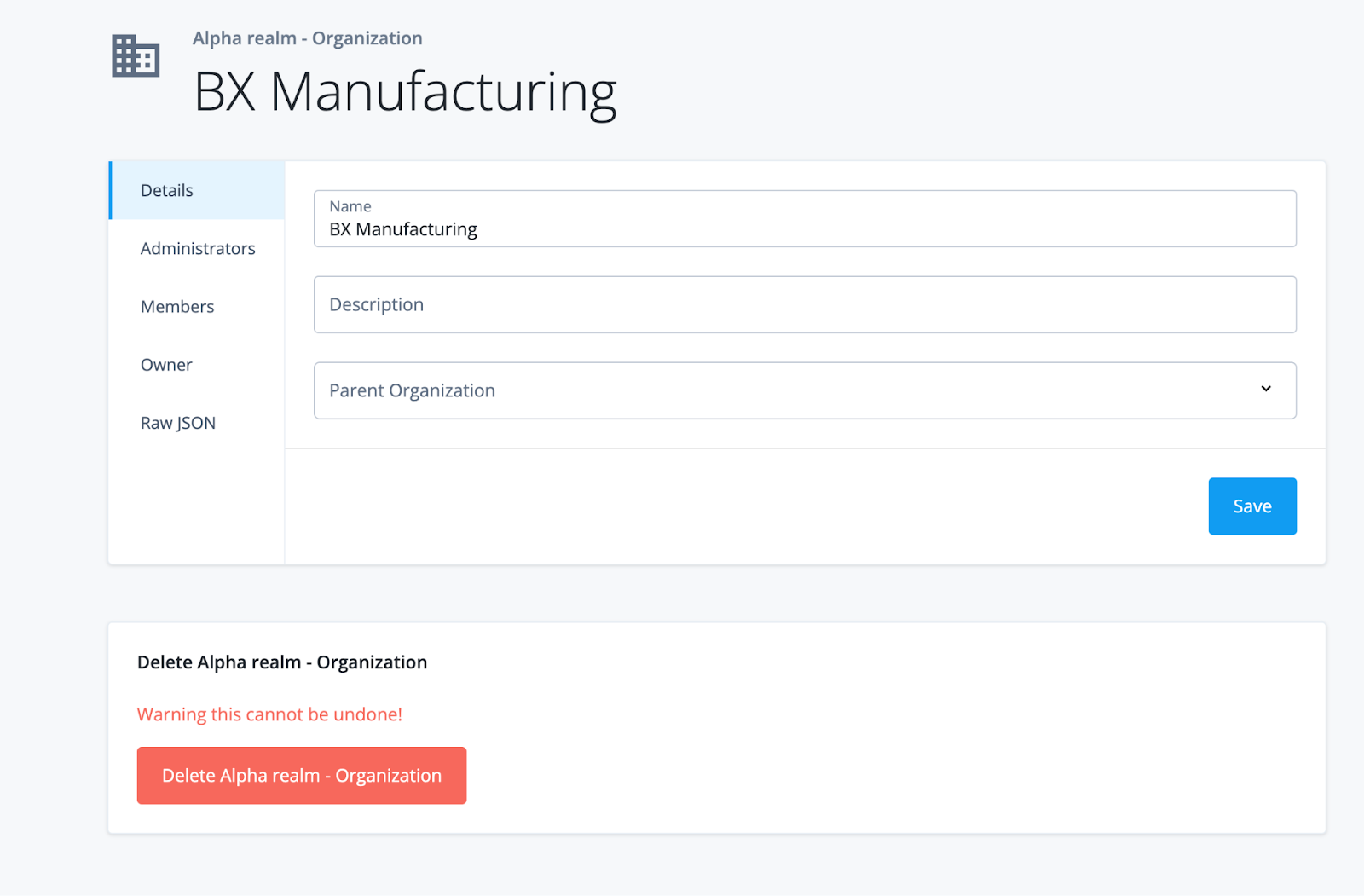
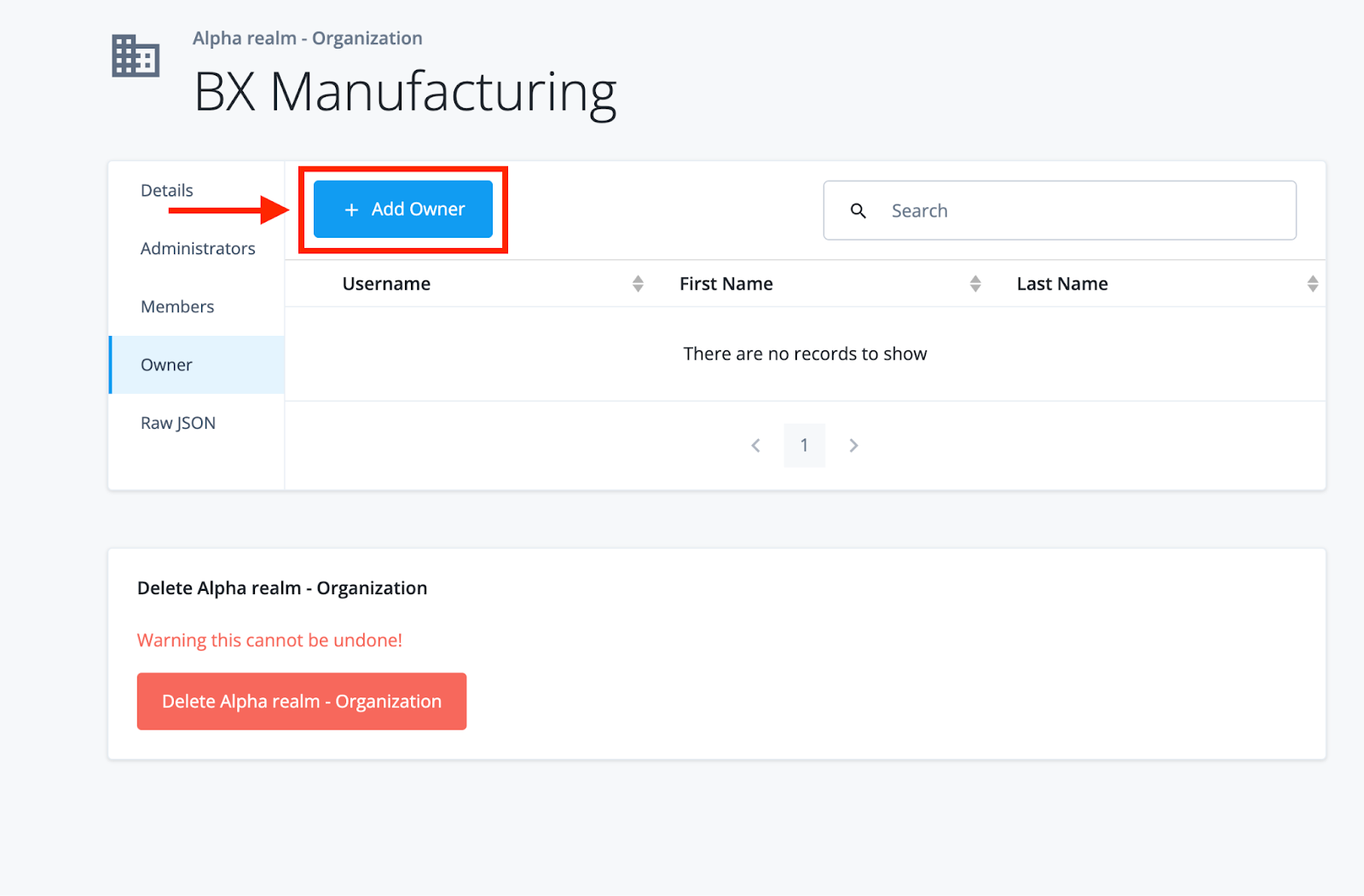
Now, an Organization is only as useful as its Relationships. With that in mind, let’s assign an Owner to this Organization so that we can delegate management of the Manufacturing Vertical and its subdivisions.
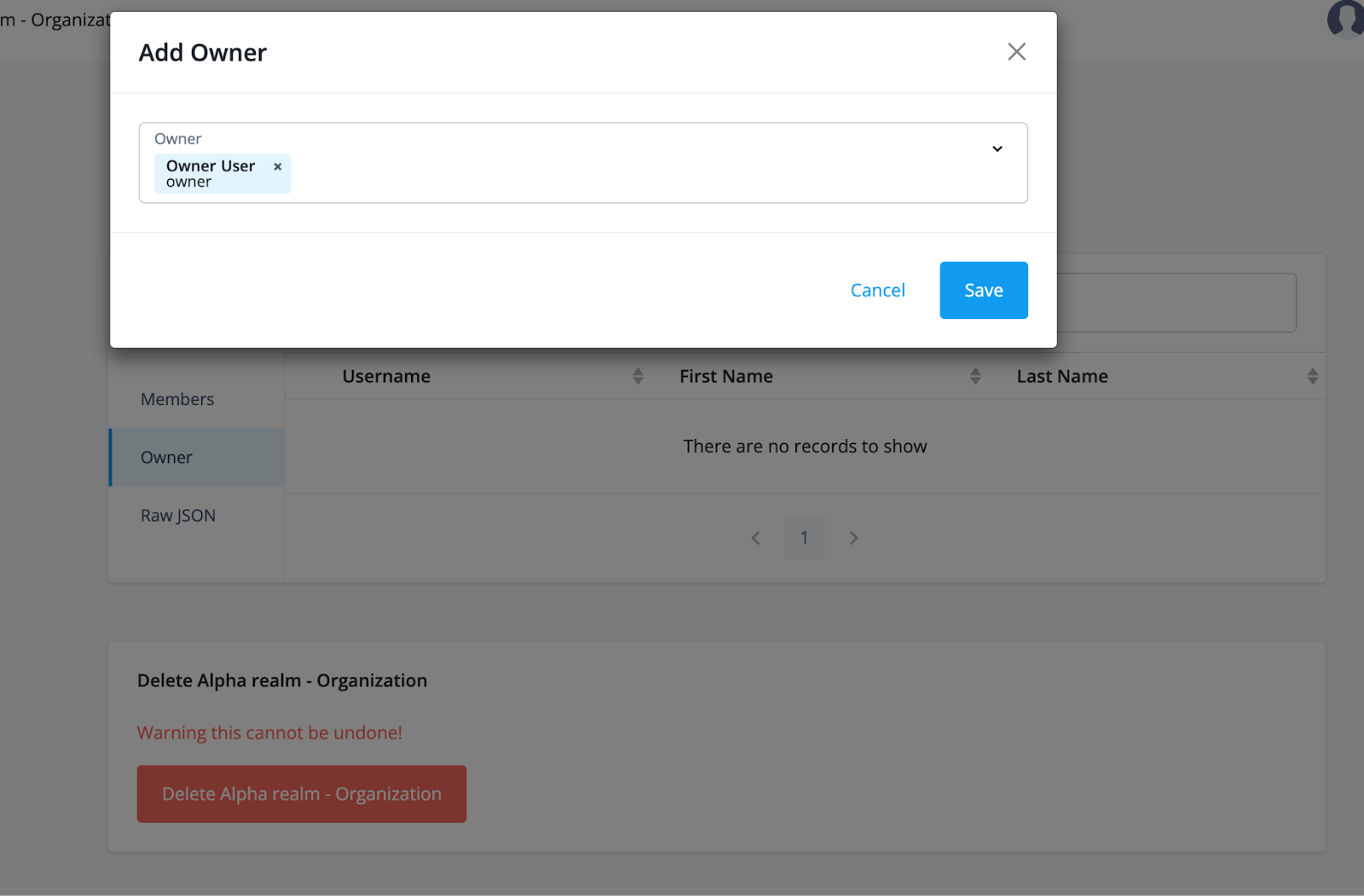
Underneath the “Owner” section, we can assign a User to our Organization. In my example, the user “Owner” has already been registered. Note that while we are assigning manually here, you can always automate this assignment during provisioning, user registration (likely via a Journey/Tree in AIC/PingAM), or (if you have Governance features in your AIC tenant) during Access Request or with a Form submission that triggers a Workflow or Approval.
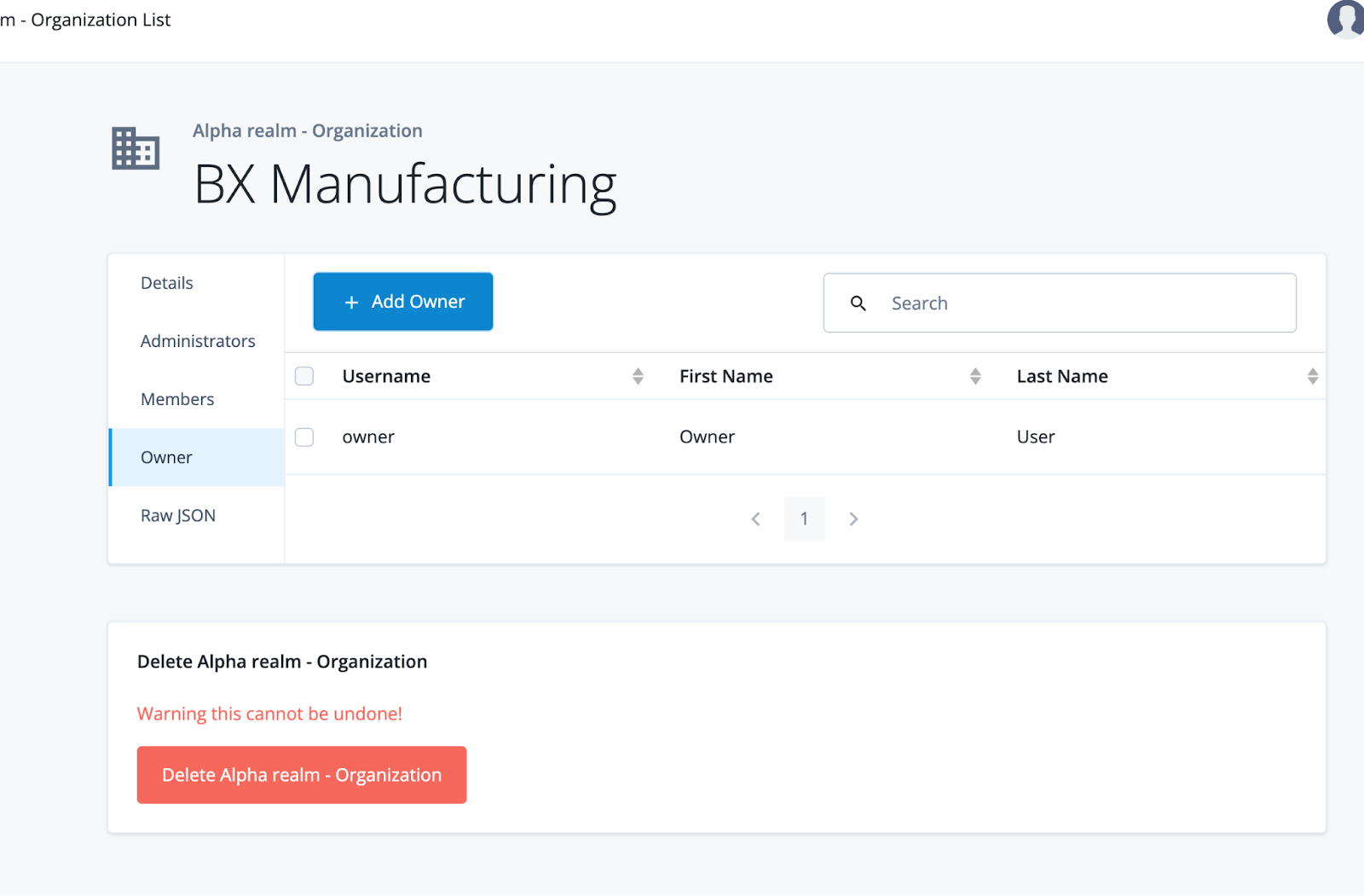
Let’s log in as the Owner User. You’ll find that you have access to update and delete BX Manufacturing and its users and can create new Organizations underneath the Organization you’re an Owner of.
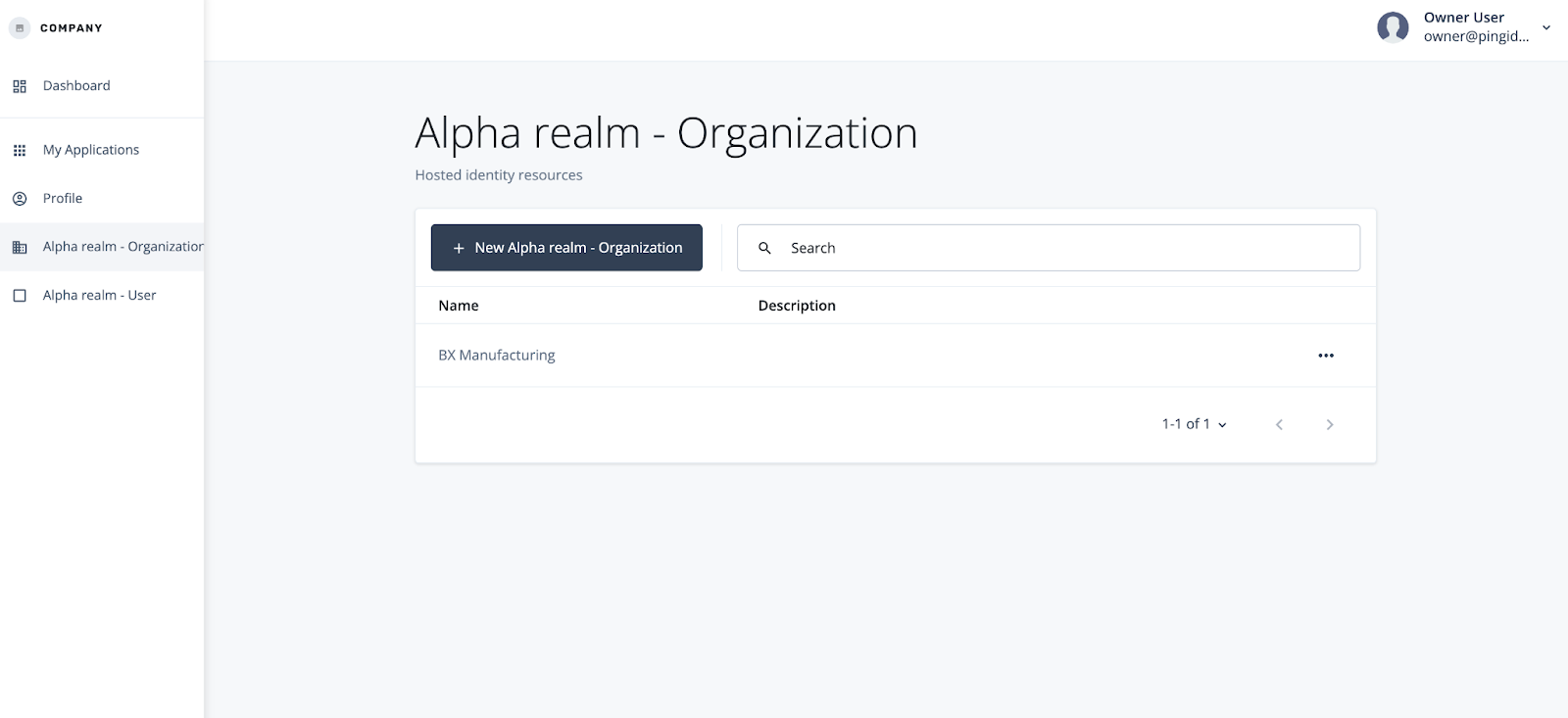

While you have very similar capabilities to the Tenant Administrator by default, you won’t have access to manage other Owners - that’s the job of the Tenant Administrator.

Since we’ve been delegated ownership of BX Manufacturing, let’s set up the Suppliers and Distributors suborganizations and assign some people to manage them. We’ll create a new Organization and assign that Organization to BX Manufacturing as a Parent.


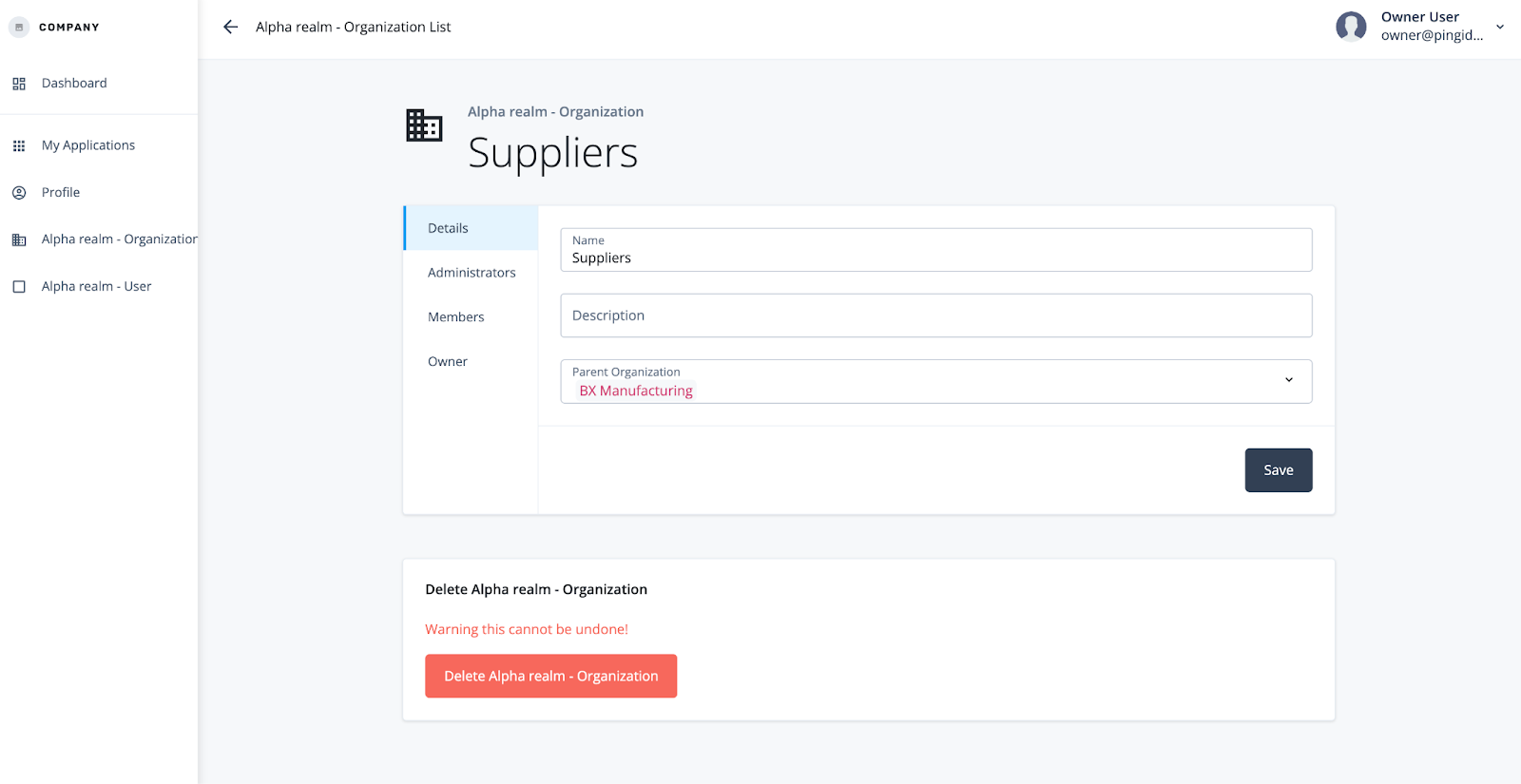
We’ll repeat the same action for the Distributors Organization.

Currently, our Organizations don’t have any Users in them. Let’s fix that. As an Owner, we can create a new User and assign them as a Member and/or an Administrator to any and all Organizations that we own and have inherited ownership to.
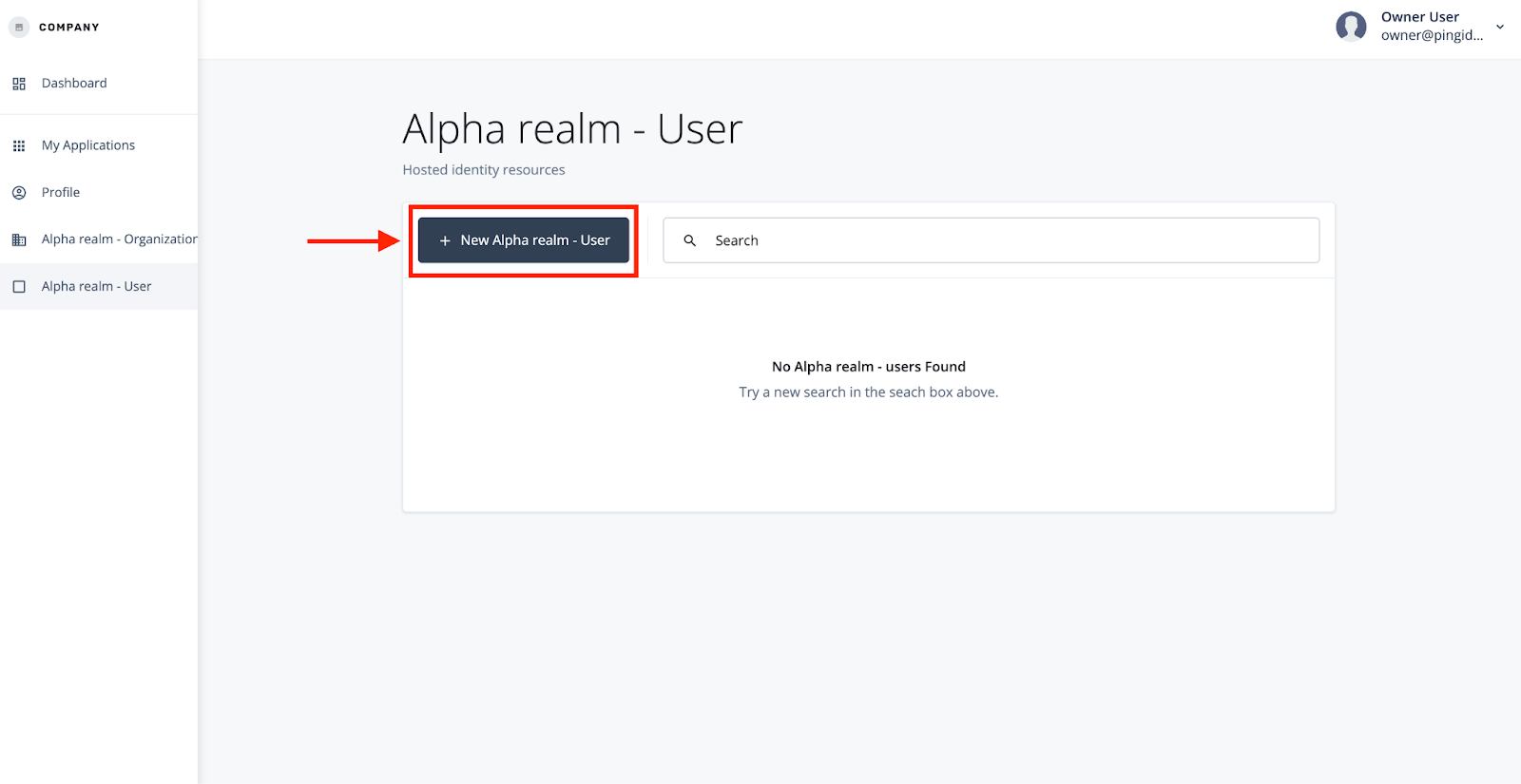


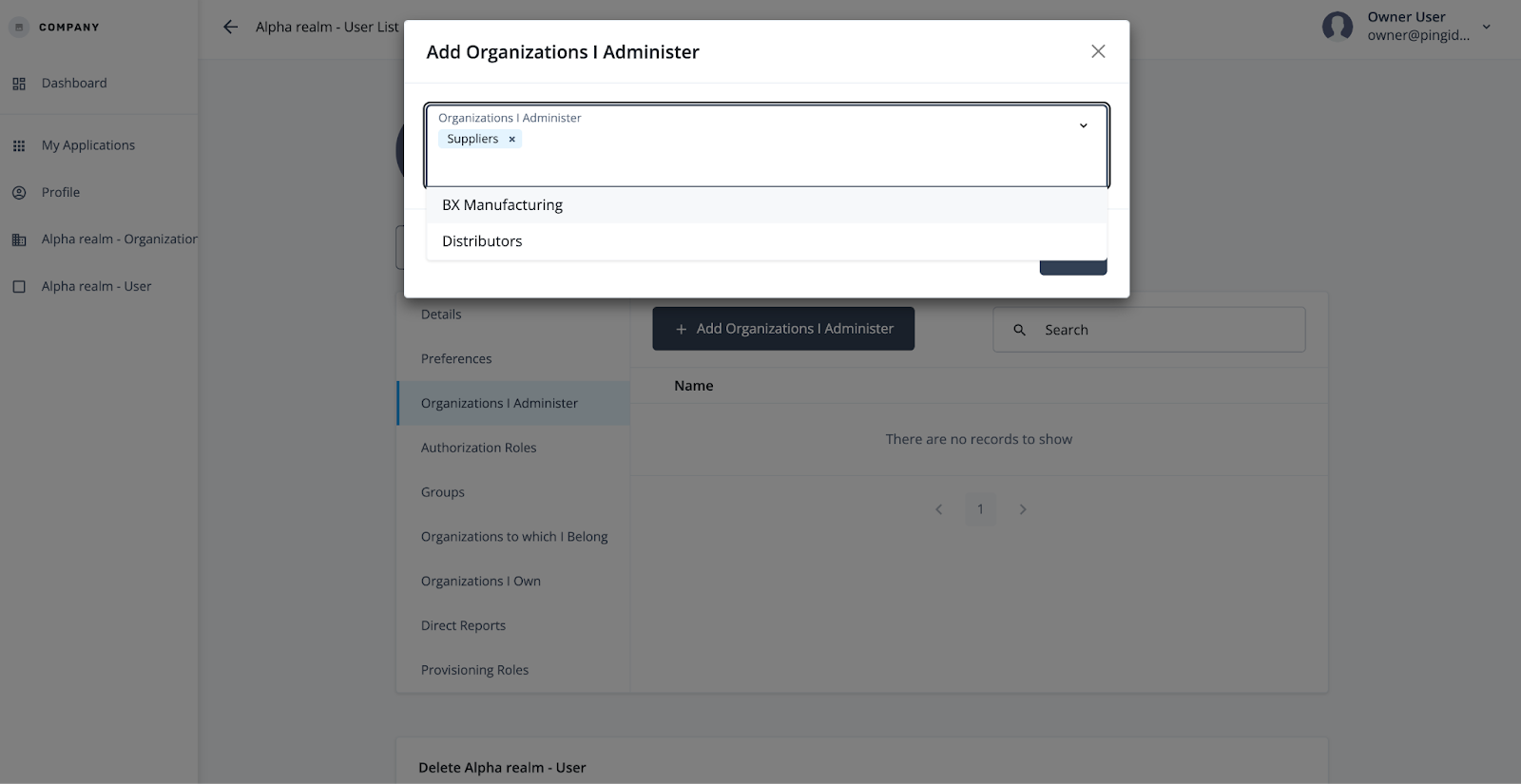
If we log out as an Owner, and log in as the Suppliers Admin (and if using a password login, make sure to set their password!), we’ll see that we only have access to the Organization that we were assigned, and unlike the Owner can’t manage other Administrators of our Organization(s).

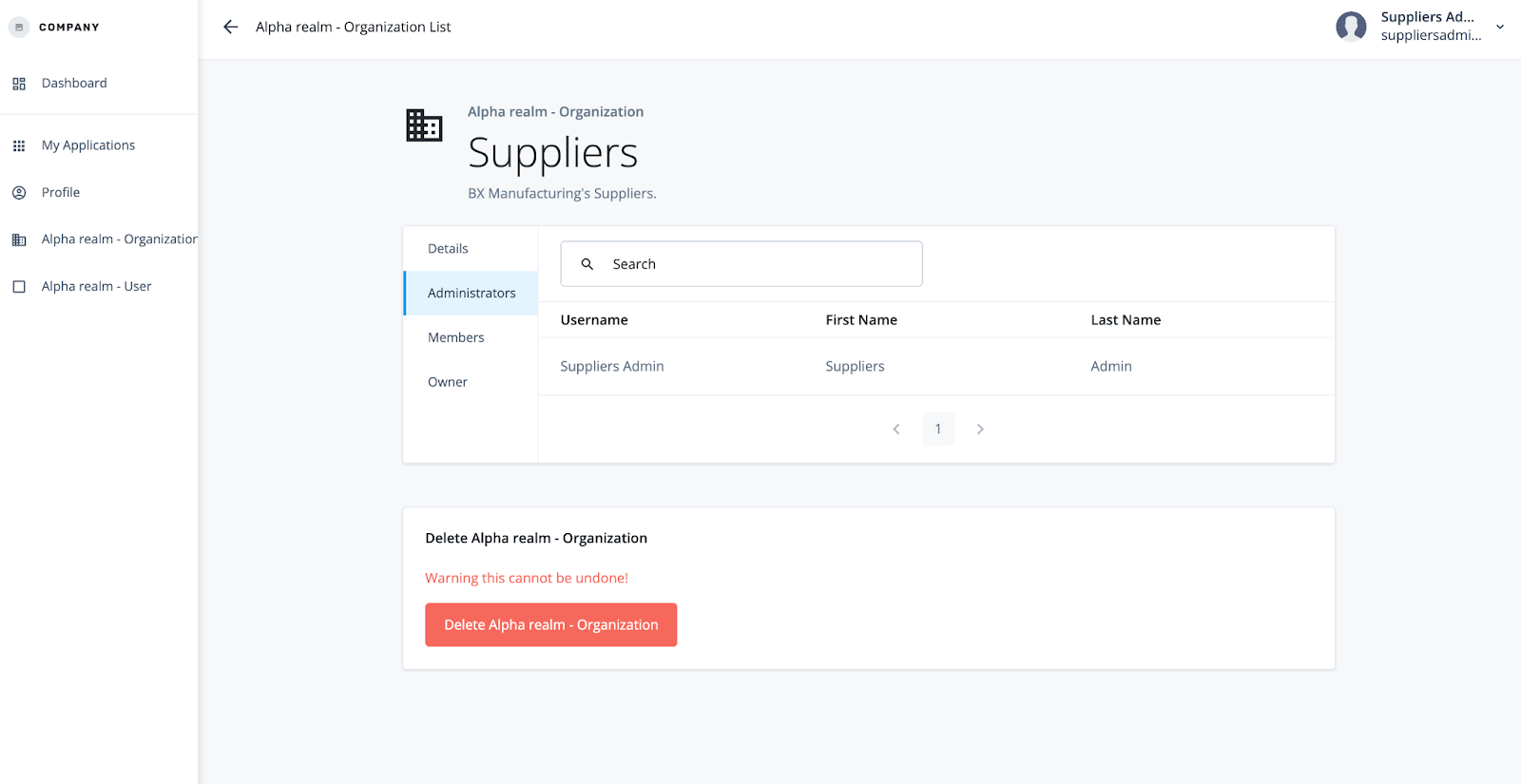
We can, however, manage our Users and create and manage new Organizations. Let’s create Supplier A and Supplier B now as children of Suppliers.
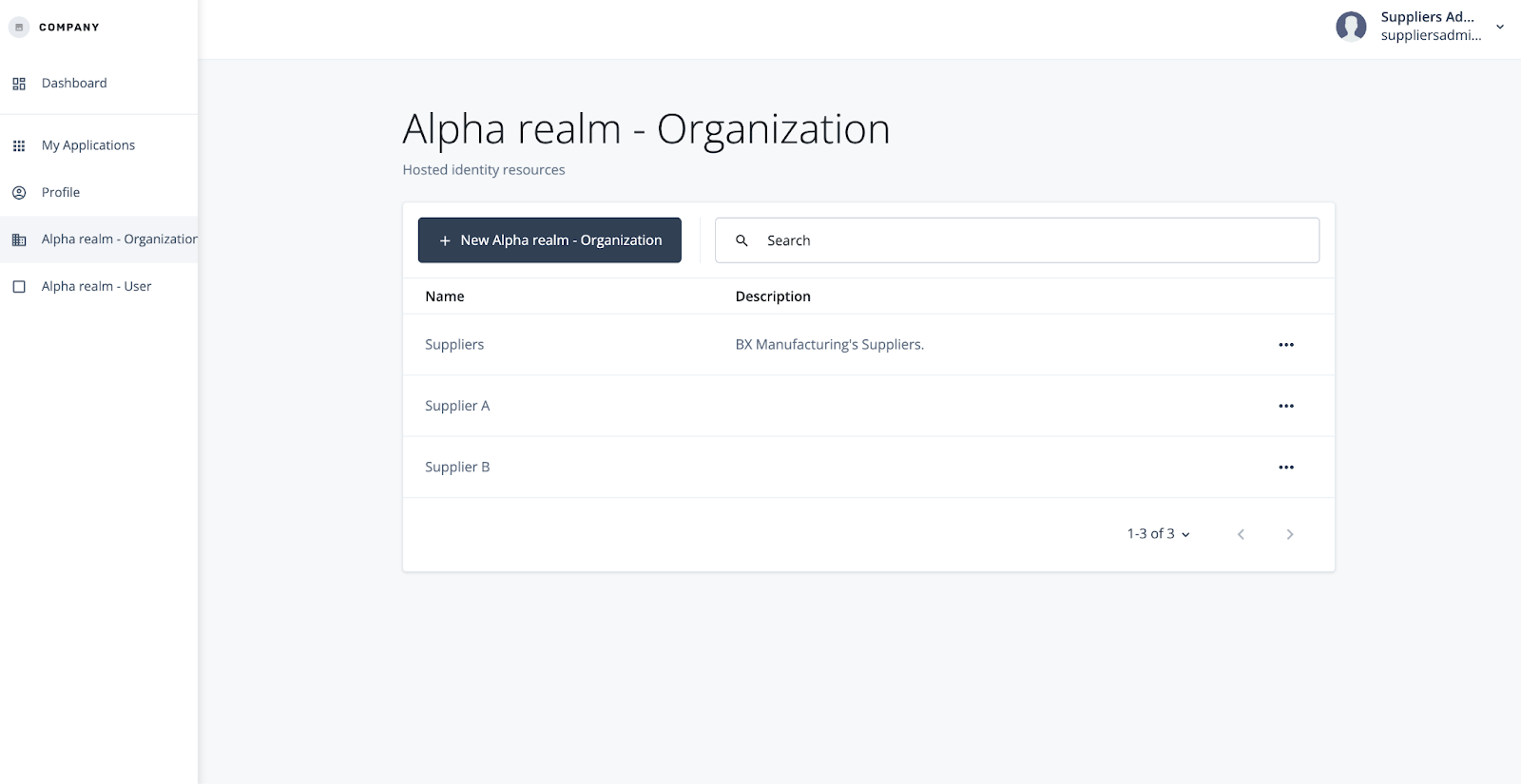
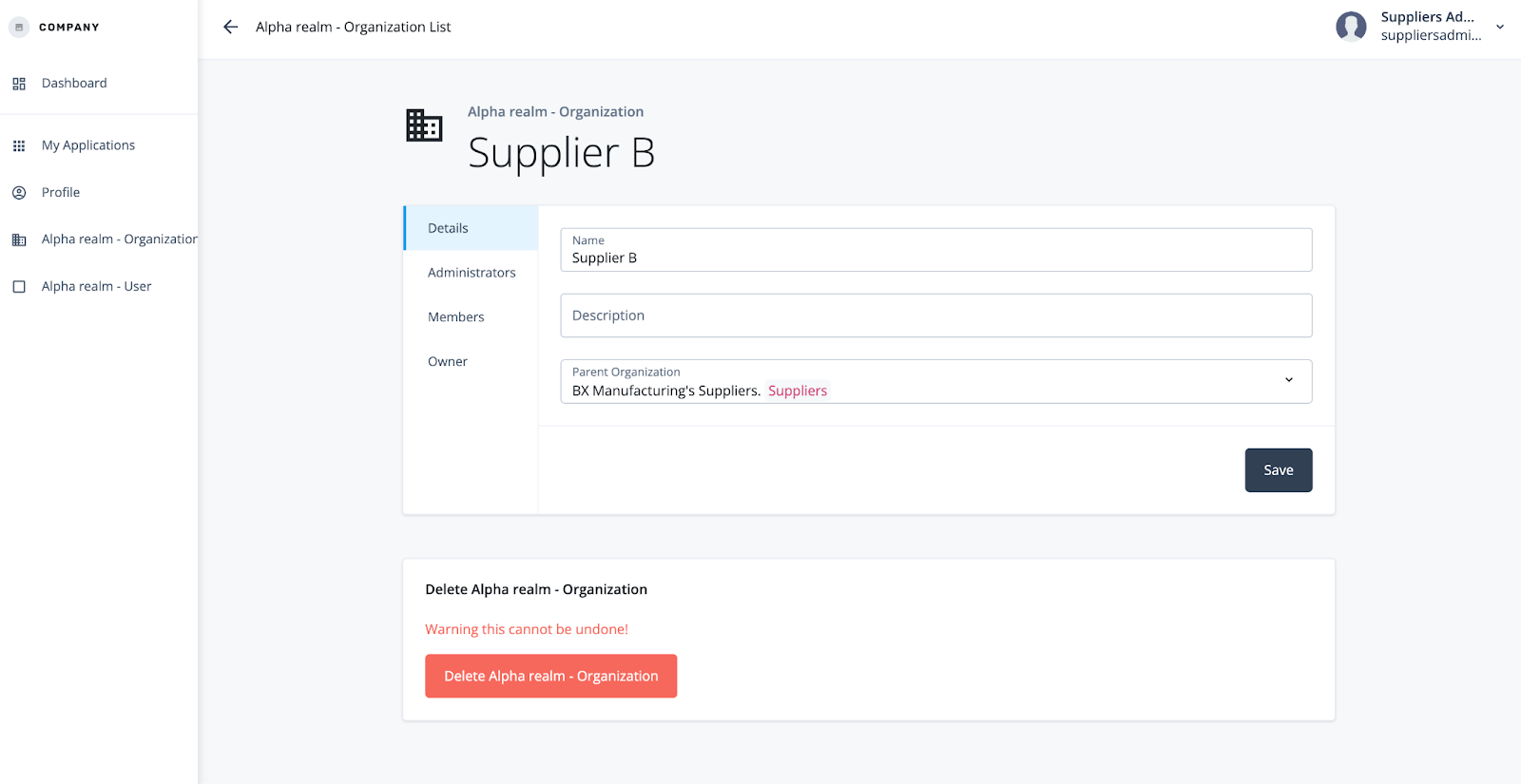
Additionally, let’s create some Users who are Members of the different Suppliers.
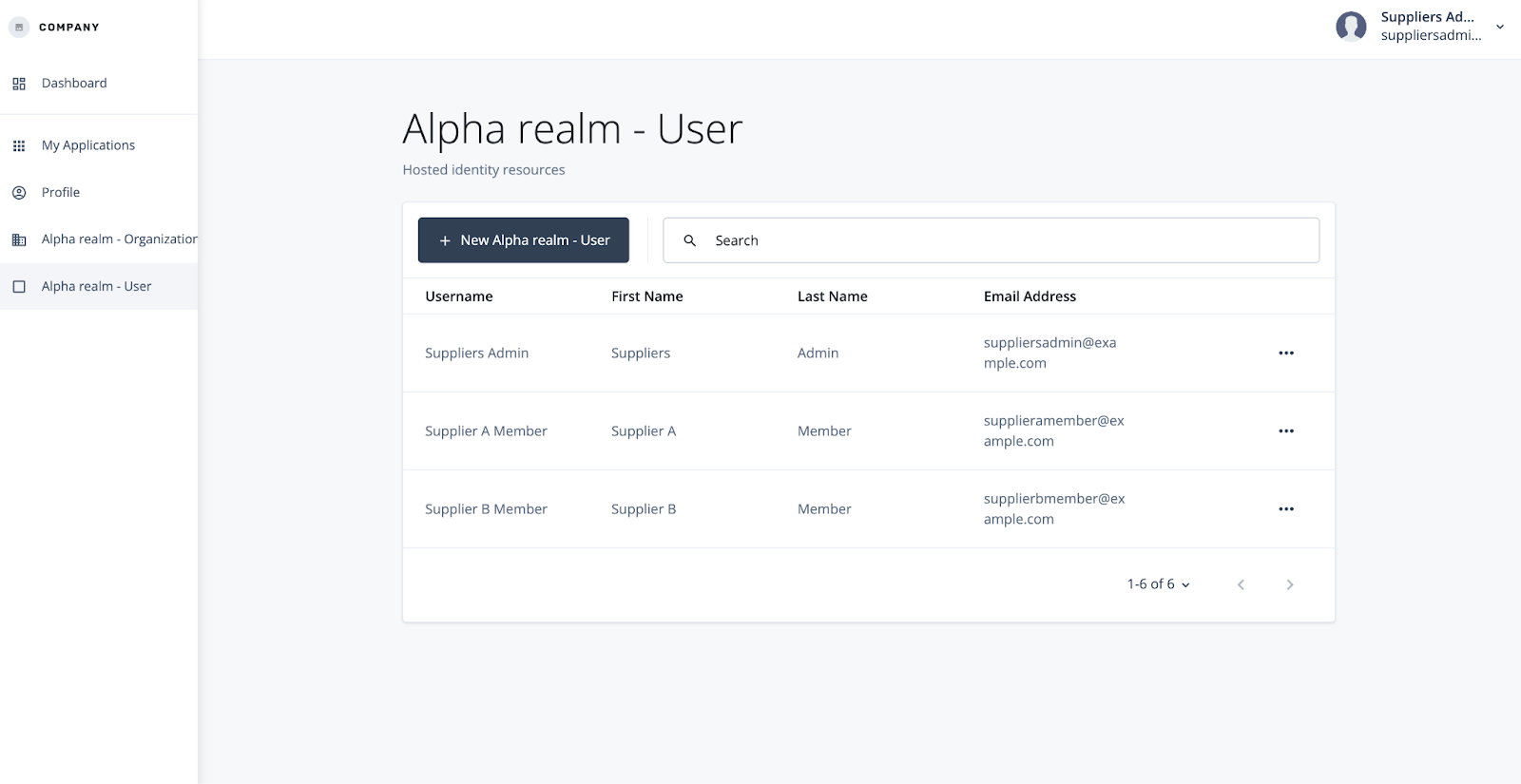
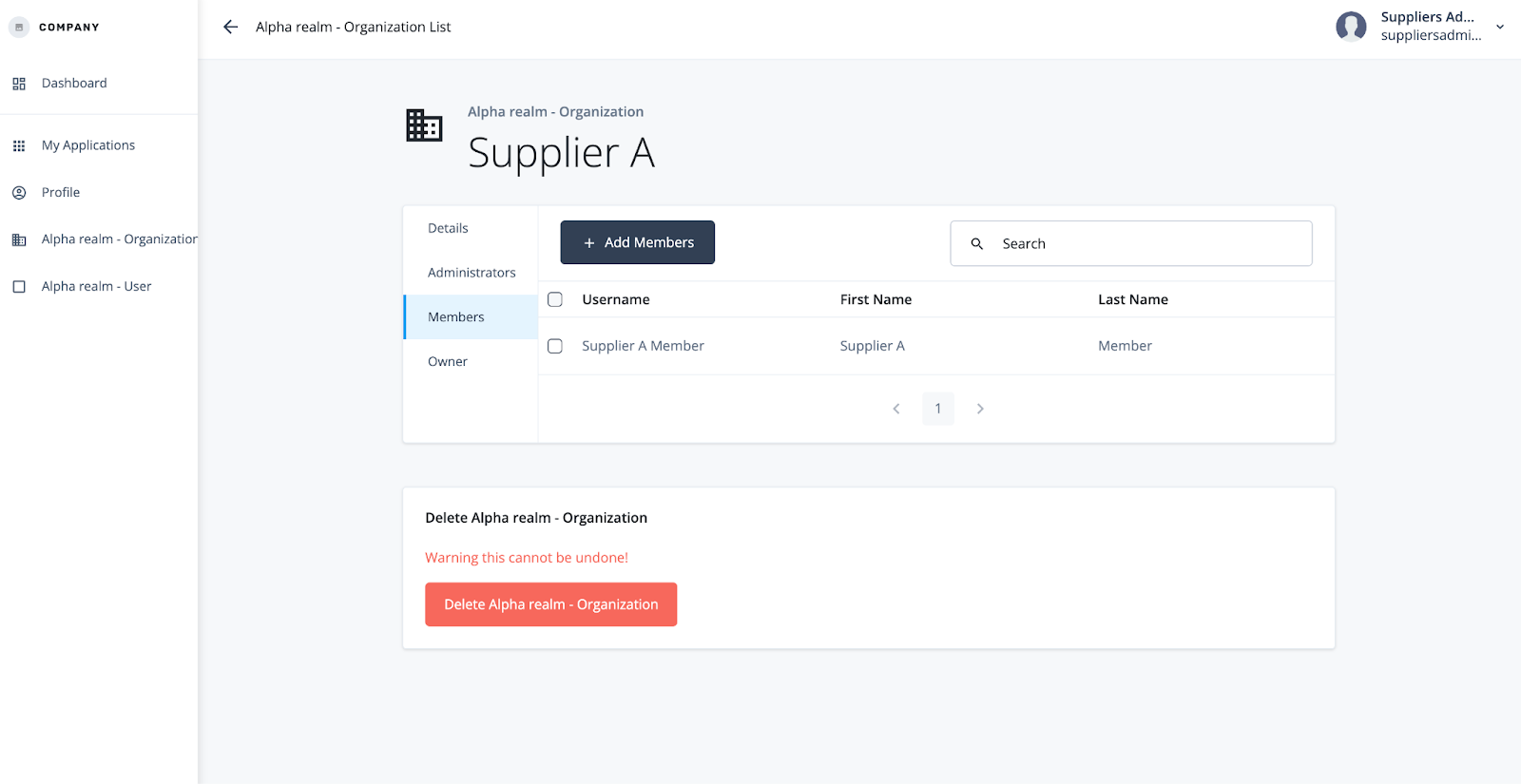
Log back in as the Owner. You’ll see that you have inherited permissions to the Suppliers and the Users made by your delegated Administrator.


Owners and Admins inherit permission to all of their sub-Organizations and its Users. Members inherit context from all of their Parent Organizations. Owners and Admins permission goes down the tree, Members context goes up.
We mentioned before that Users can have more than one Relationship to one or more Organization(s). Let’s say, for example, that Supplier B interacts with Distributor A to sell OEM add-ons to a customer, like a spoiler on a car. Since BX Manufacturing is the creator and owner of the finished product, they must be intrinsically involved in the linkage between this Supplier and Distributor. Here we’re dealing with a B2B2C scenario, or Business-to-Business-to-Consumer.
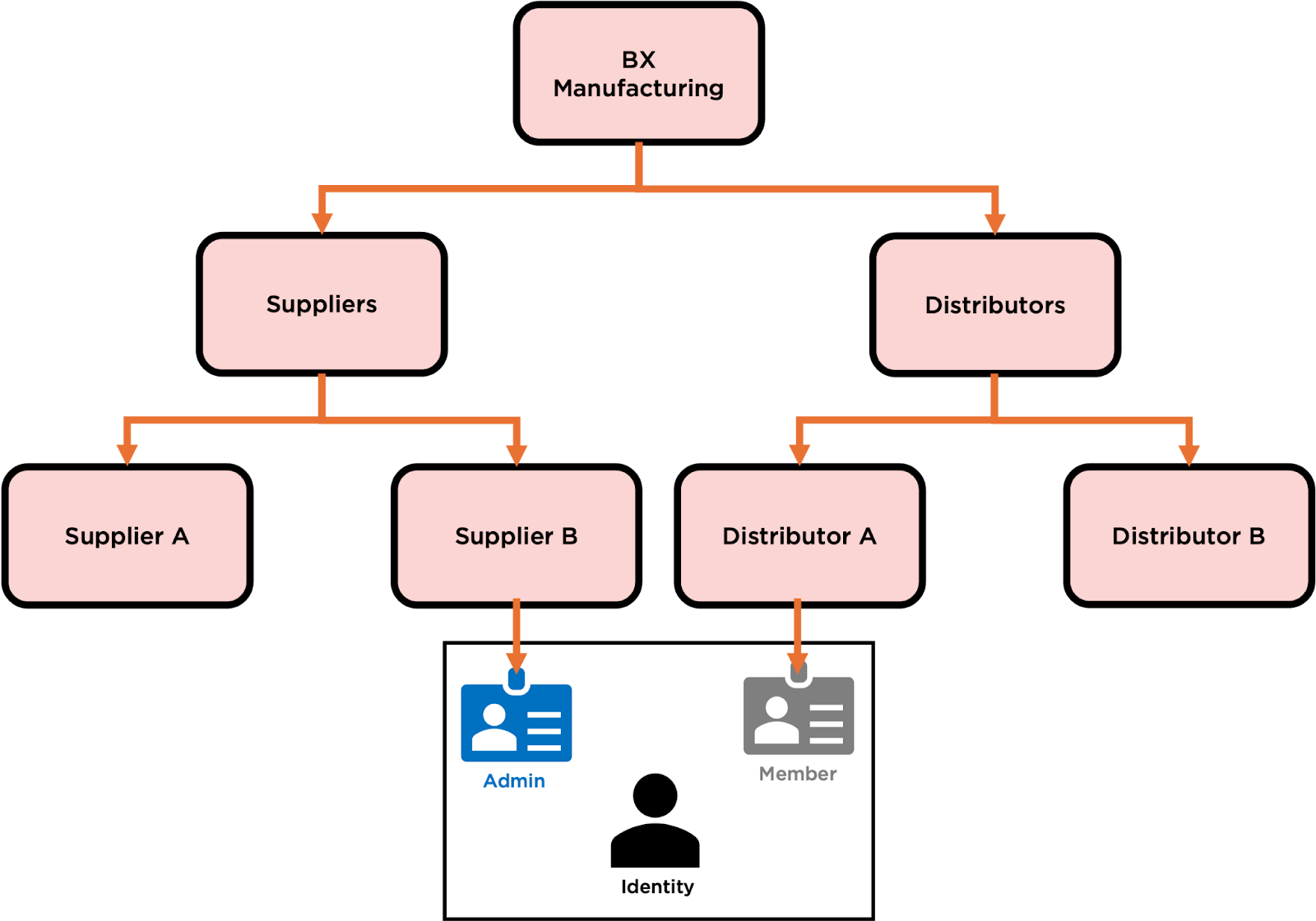
In this situation, our User is an Admin to Supplier B and is also a Member to Distributor A. At the end of the day, this is the same person with the same account and the same login but with different relationships to each Organization. One person is tied to a single identity, but the Relationships that they have to the Organizations give them different permissions to Organizations and Users and give others different permissions to them.
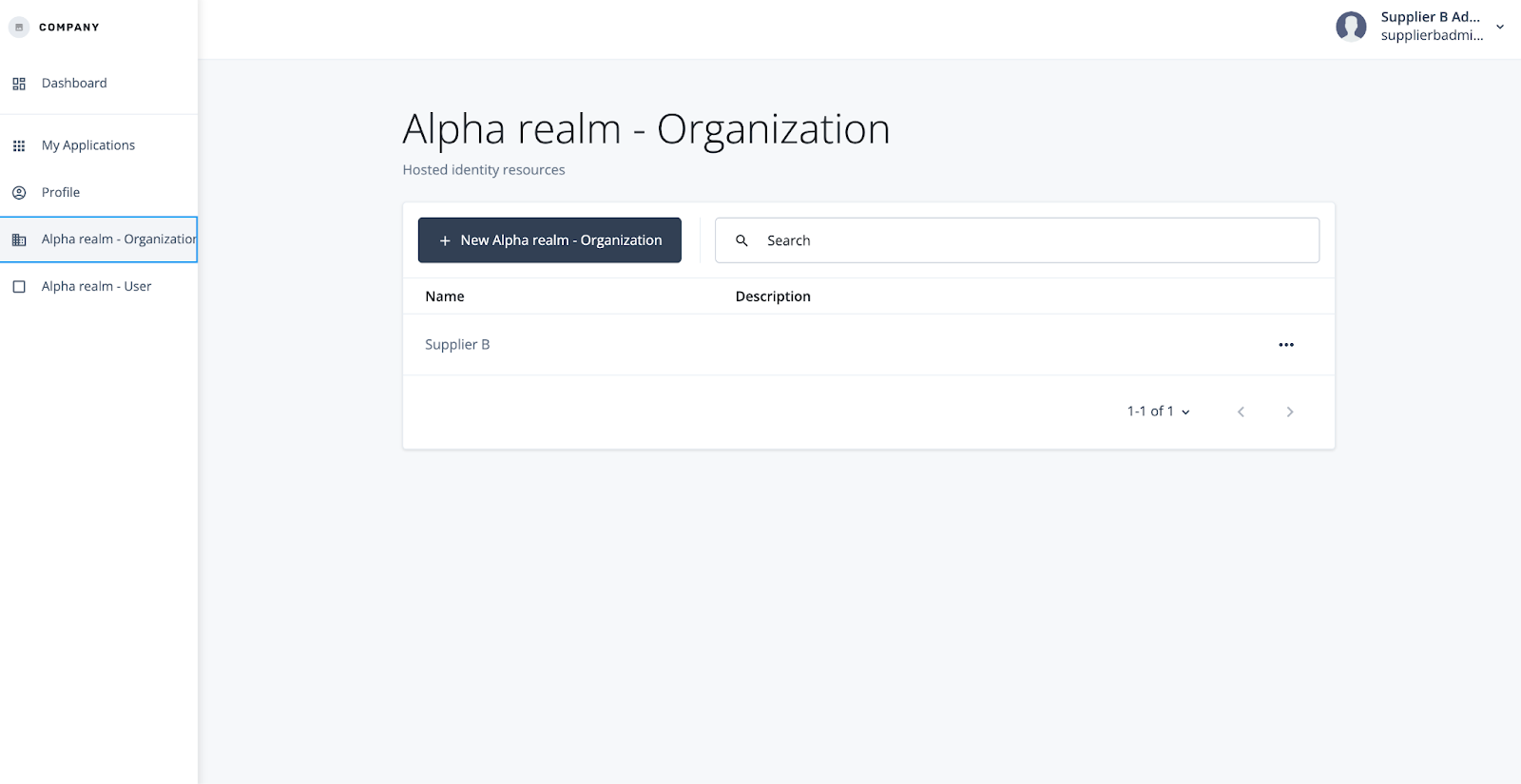
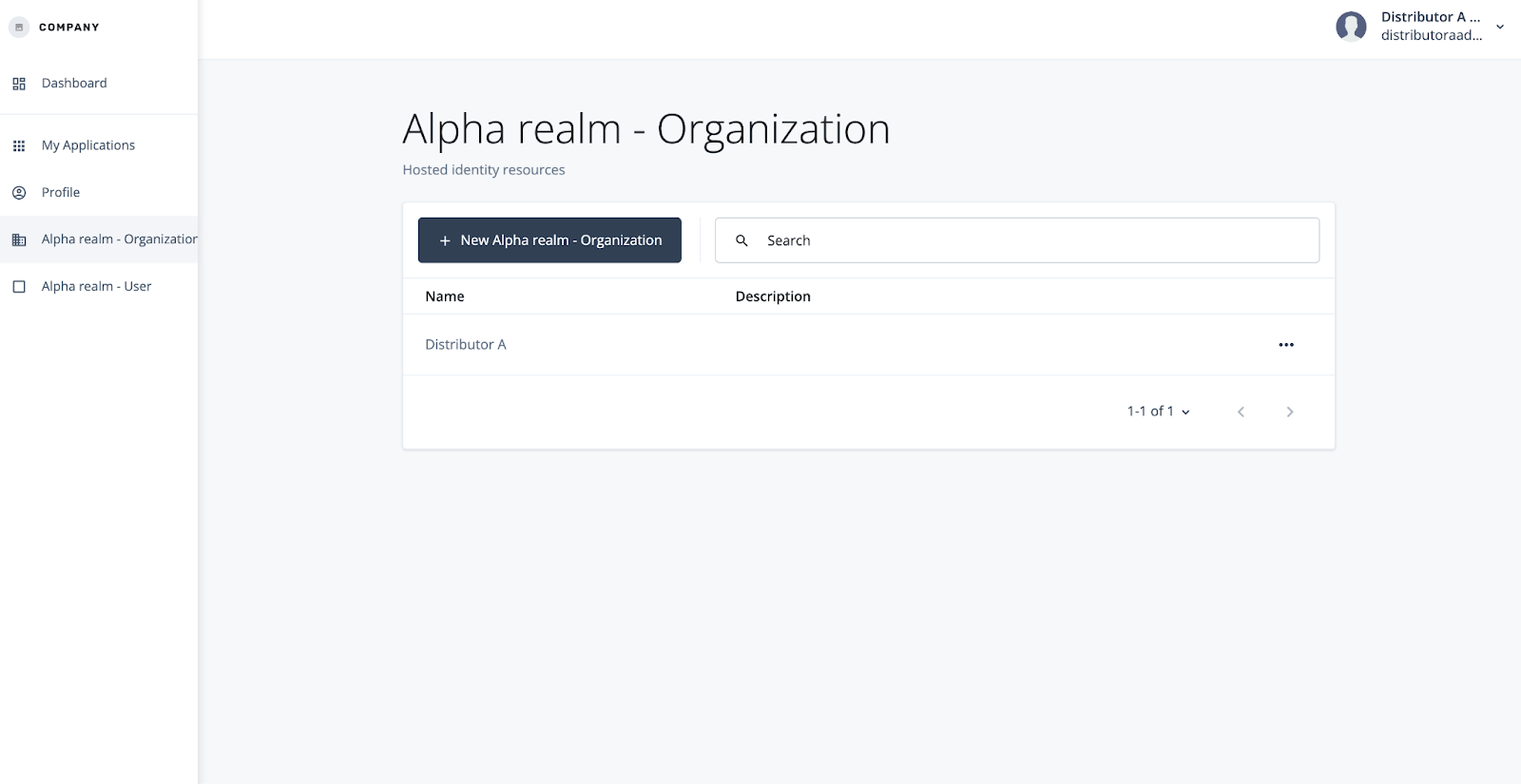
In practice, as the user Supplier B Admin I can see Supplier B and the Members associated with Supplier B. As Distributor A Admin, I can see and manage Supplier B Admin because they’re a Member of my Organization.
My Supplier received the context they needed to interact with Distributor while still being able to manage their own Users and Supplier information. My Distributor cannot receive the context of the Supplier but can manage the suppliers associated with their Organization.


Referencing the Organization Model in the Platform
Advanced Identity Cloud takes the Organization Model one step further and incorporates it throughout its platform. That way, actions and interactions can reference the context and relationships to make unique experiences and define specific permissions defined by each individual user.
To start, the openidm binding allows you to access and manage any IDM data throughout AIC. This gives you the flexibility to interact with your Organization throughout the User journey, for example:
- An Event Hook that auto-assigns Organization membership based on a Property or Group they’re a member of (for example, a specific AD OU)
- A Custom Endpoint that returns Relationship information for decentralized Policy Enforcement
- User Journeys where things like branding, MFA, and risk policies are dictated by the configuration on the Organization
- Access Token Modification where the token includes context of what Organizational privileges the User has
To give you a sense of what actions are useful in the context of Organizations, take a look at this Library Script that you can use wherever Next-Gen scripting is available.
If you have Governance enabled within your AIC Tenant, Organizations appear in the following places:
- Owners and Admins can request access to Applications, Entitlements, and Roles on behalf of their Members.
- Identity Certification Campaigns can be filtered to Users in specific Organizations
- Scopes can be filtered to specific Organizations and Relationships (e.g. Owner/Admin/Member)
- Forms allow a dynamically enumerated list of Organizations as a Multi-select option
Just like with the rest of the platform, you can utilize the same bindings to interact with the Organization in actions such as Workflows.
Extending the Organization Model
So where do we go from here?
Organizations give us a template with pre-built relationships that can be referenced throughout Ping’s platform. And that’s just it: it’s a template upon which we can extend and expand to meet the needs of our organization.
As a start, add Properties to your Organization - things you see your business units and partnerships doing over and over again that could (and should) be standardized.
Once you’ve built that model the way you like it, connect the model to your platform. It could be a way to control branding, extended support capabilities, or something completely different - work with your stakeholders to decide what is important for them and their users to have and to manage.
When you’ve got the model in a place you like, delegate administration to the capabilities you’d like to share with your partnerships. You own the model, and you delegate the controls.
If you see that the parent organizations need more control than the children, consider applying inheritance rules.
And, as you expand, keep changing it! The beauty of this template is that it grows with you: you can enable the right experience, security, lifecycle, and overall IAM strategy for each and every use case without having to rebuild your entire platform every time a new business requirement comes along.
Conclusion
Through this Guide we have:
- Learned about the key elements of IDM that make up the Organization model
- Learned how the Organization model applies these concept
- Created, delegated, and managed Organizations and Users
- Learned how to connect Organizations throughout AIC
- Learned about common approaches in extending the Organization model to meet our business needs
The Organization model provides you the bricks to build dynamic, magical experiences for your Administrators and your Users. And with this foundation the only limit you have is your imagination.
Appendix:
Default Properties
By default, your Organization will have the following Properties:
| Property Name (REST API) | Property | Description |
|---|---|---|
| name | Name | The name of the Organization |
| description | Description | The description of the Organization |
| owners | Owners | Relationship to User (Orgs I Own): many-to-many |
| admins | Admins | Relationship to User (Orgs I Administer): many-to-many |
| members | Members | Relationship to User (Orgs to which I Belong): many-to-many |
| parent | Parent | Relationship to Organization (Children): one-to-many |
| children | Children | Relationship to Organization (Parent): many-to-one |
| ownerIDs | Owner User IDs | RDVP calculated from Owners: List of IDs of every User that is a direct Owner to this Org |
| adminIDs | Admin User IDs | RDVP calculated from Admins: List of IDs of every User that is a direct Admin to this Org |
| parentAdminIDs | User IDs of Parent Admins | RDVP calculated from Parent: List of IDs of every User that is an Owner to a Parent of this Org, including by inheritance |
| parentOwnerIDs | User IDs of Parent Owners | RDVP calculated from Parent: List of IDs of every User that is an Admin to a Parent of this Org, including by inheritance |
| parentIDs | Parent Org IDs | RDVP calculated from Parent: List of IDs of every Parent of this Org, including by inheritance |
Your User also has some Properties tied to the Organization:
| Property Name (REST API) | Property | Description |
|---|---|---|
| ownerOfOrg | Organizations I Own | Relationship to Organization (owners): many-to-many |
| adminOfOrg | Organizations I Administer | Relationship to Organization (admins): many-to-many |
| memberOfOrg | Organizations to which I Belong | Relationship to Organization (members): many-to-many |
| memberOfOrgIDs | MemberOfOrgIDs | RDVP calculated from Org Members: List of IDs of every Organization I belong to, including by inheritance |
Note that AIC provides general purpose extension attributes for cases in which you need to index additional values as a means to protect tenant response time. This is not a limitation in PingIDM.