Configuring Case-Insensitivity REST API Searches for a JDBC Repository
Author: |
Sheila Albertelli |
Created at: |
Oct 2020 |
Updated at: |
Apr 2023 |
Introduction
ForgeRock supported JDBC repositories are generally case-sensitive by default. The IDM default repo, ForgeRock® Directory Services (DS) is case-insensitive, which allows native case-insensitive searches directly to the repository or through the REST API.
The approach set in Configuring Case Insensitivity For a JDBC Repository allows the database to perform these functions. The problem resides in the JDBC connector driver, which overwrites key values and forces case-sensitive REST API searches regardless of database collation setting. Additional configuration changes need to be made to allow case-insensitive REST API searches. I will review these steps using Oracle Database 12c and PostgresSQL 9.2.x as the backends.
Oracle DB as an IDM Repository
Set Collation for Oracle 12c
Assuming an Oracle DB instance has been set up and extended data types have been enabled, execute the following command to set the collation at the database level:
ALTER SYSTEM SET NLS_SORT=BINARY_CI SCOPE=SPFILE;
ALTER SYSTEM SET NLS_SORT=BINARY_CI SCOPE=SPFILE;
SHUTDOWN;
STARTUP;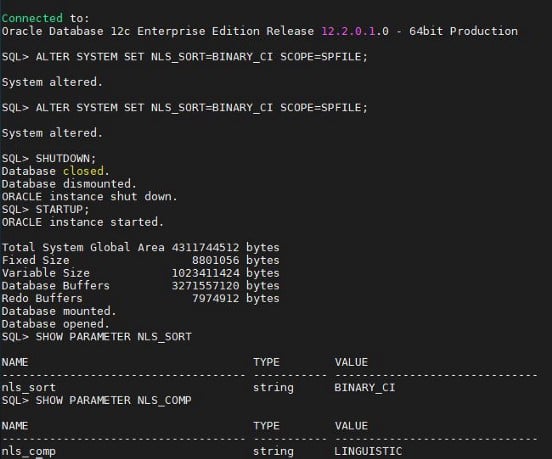
Start IDM with one-way synchronization CSV sample
Following the installation guide to set up Oracle as the IDM repository, start IDM with the following sample:
/startup.sh -p /opt/forgerock/openidm/samples/sync -with - csv/This sample demonstrates one-way synchronization from an external resource to an IDM repository. The external resource in this case is a simple CSV file. User objects in that file are synchronized with the managed users in the IDM repository.
Note: Don’t forget to copy both the modified datasource.jdbc-default.json and repo.jdbc.json to the sync-with-csv project’s conf folder.
Reconcile accounts with the IDM managed user repository.
Once IDM is up and running, run the reconciliation:
System/CSV = >Managed/User
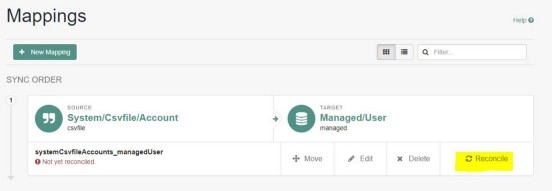
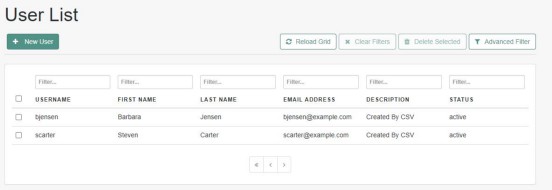
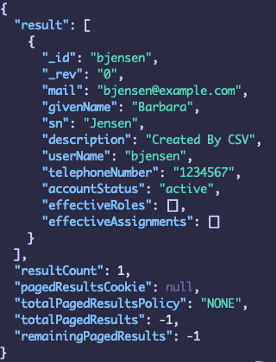
Once reconciled, you will see two new users (bjensen and scarter) in your list:
Solution
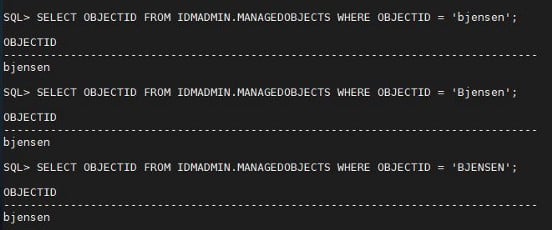
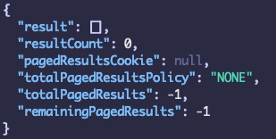
The cause of this is due to the Oracle JBDC Thin driver setting the default values of NLS_LANG (NLS_SORT retrieves its value from NLS_LANG). In order to override these values, a trigger will have to be created in Oracle. This will force the collation settings (session-level) after a new connection to the database:
SQL> create or replace trigger after_logon
 2 after logon on database
 3 declare
 4 begin
 5 execute immediate 'alter session set nls_sort = ''binary_ci''';
 6 execute immediate 'alter session set nls_comp = ''linguistic''';
 7 end;
 8 /
Trigger created.
Once the trigger has been created, restart IDM to reestablish the connection:
GET /openidm/managed/user?_queryFilter=UserName+eq+’BJENSEN’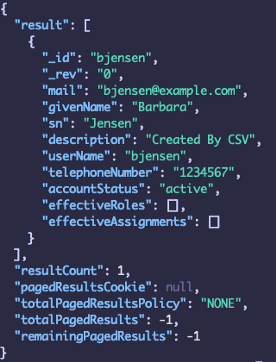
PostgreSQL as an IDM repository
Give database admin user proper rights
Assuming you have installed PostgreSQL and followed Setting Up a PostgreSQL Repository, superuser rights will have to be designated to the ‘openidm’ database user to allow the use of the citext extension.
ALTER USER openidm WITH SUPERUSER;Note: The use of explicit tables is required, according to the installation guide:
For a PostgreSQL repository, use an explicit table structure if you require case-insensitivity. Managing case-insensitivity at scale with generic tables in PostgreSQL is not supported. For more information about generic and explicit object mappings, see “Generic and Explicit Mappings With a JDBC Repository” in the Integrator’s Guide.
citext Extension
This module calls the lower functional internally with no manual intervention.
My lab environment is running CentOS 7, so I have used the following command to install the package:
$ sudo yum install postgresql-contrib
Create and enable the citext extension using the ‘openidm’ user:
CREATE EXTENSION IF NOT EXISTS citext WITH SCHEMA public;List enabled extensions:
openidm-# \dx
                           List of installed extensions
  Name   | Version |   Schema   |                   Description
---------+---------+------------+--------------------------------------------------
 citext  | 1.4     | public     | data type for case-insensitive character strings
 plpgsql | 1.0     | pg_catalog | PL/pgSQL procedural language
(2 rows)
Assuming the sample-explicit-managed-user.sql data definition script
was used to set up the corresponding tables, modify the userName column
type to citext and recreate indexes:
ALTER TABLE managed_user ALTER COLUMN username TYPE citext;
DROP INDEX idx_managed_user_userName;
CREATE UNIQUE INDEX idx_managed_user_userName ON openidm.managed_user (username ASC);
Start IDM with one-way synchronization CSV sample
Given the same instructions (Oracle DB) above, start IDM with the sync-with-csv sample and run the reconciliation of the users:
./startup.sh -p/opt/forgerock/openidm/samples/sync -with - csv/Note: Don’t forget to copy both the modified datasource.jdbc-default.json and repo.jdbc.json to the sync-with-csv project’s conf folder.
Test case-insensitivity searches
A direct query search to your database will confirm case-insensitivity:
openidm=# SELECT username FROM openidm.managed_user WHERE userName = 'bjensen';
 username
----------
 bjensen
(1 row)
openidm=# SELECT username FROM openidm.managed_user WHERE userName = 'BJENSEN';
 username
----------
 bjensen
(1 row)
 +
Querying the managed object via REST API will show a different result:
GET /openidm/managed/user?_queryFilter=UserName+eq+’bjensen’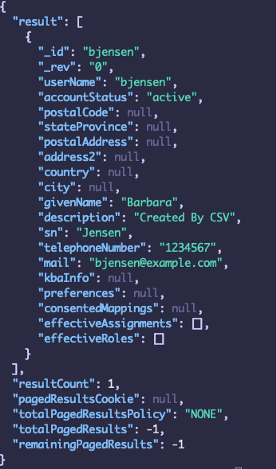
GET /openidm/managed/user?_queryFilter=UserName+eq+’BJENSEN’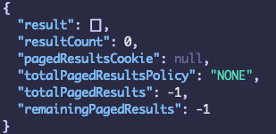
Solution
As you may have guessed it by now, the problem relies on the JDBC connector itself. In this case, the PostgreSQL JDBC Driver is performing a comparison between a citext and varchar field and forcing the string to be varchar (case sensitive option).
The alternative is to set the stringtype in the connection parameter in datasource.jdbc-default.json to be unspecified. This allows the parameters to be sent to the server as untyped values:
"jdbcUrl" : "jdbc:postgresql://&{openidm.repo.host}:&{openidm.repo.port}/openidm?stringtype=unspecified",Restart IDM to reflect changes:
GET /openidm/managed/user?_queryFilter=UserName+eq+’BJENSEN’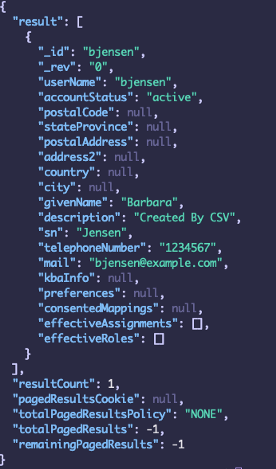
Conclusion
The solutions described here are one way to solve this problem. Depending on the use cases, this can also be remediated by building a custom JDBC driver (connector level).
Note: It is important to perform a lot of testing when implementing these types of workarounds in the database. Note that additional tuning and performance testing will be needed to fully satisfy specific use cases/requirements.
ForgeRock IDM 7 > Installation Guide > PostgreSQL Repository
This procedure assumes that PostgreSQL is installed and running on the local host. For supported versions, see .

ForgeRock IDM 7 > Samples Guide > Synchronize Data From a CSV File to IDM
This sample demonstrates one-way synchronization from an external resource to an IDM repository.
ForgeRock IDM 7 > Object Modeling Guide > Generic and Explicit Object…
By default, IDM uses a generic mapping for user-definable objects, for both a JDBC and a DS repository. A generic mapping speeds up initial deployment, and can make system maintenance more flexible by providing a stable database structure. In a…