Kerberos for Identity Cloud
Author: |
Justin Chin |
Created at: |
Jan 2023 |
Updated at: |
Sep 2023 |
Kerberos for Identity Cloud
Overview
The following instructions step through integrating Kerberos with Identity Cloud. This article assumes you have a functioning Kerberos environment with IG deployed. Once these components are in place, we can add a single route and define a specific journey we will use for integrating the Kerberos environment.
Prerequisite
-
Setup a working Kerberos environment with IG deployed and configured. from [
Kerberos Setup.pdf (67.7 KB)
Summary
-
You will need a JWK. For testing purposes, you can use an online JSON web key generator, such as https://mkjwk.org/, to generate a key pair in JWK format.
Identity Cloud Details
Here is an example of a simple journey for our setup - (And here is the Source):
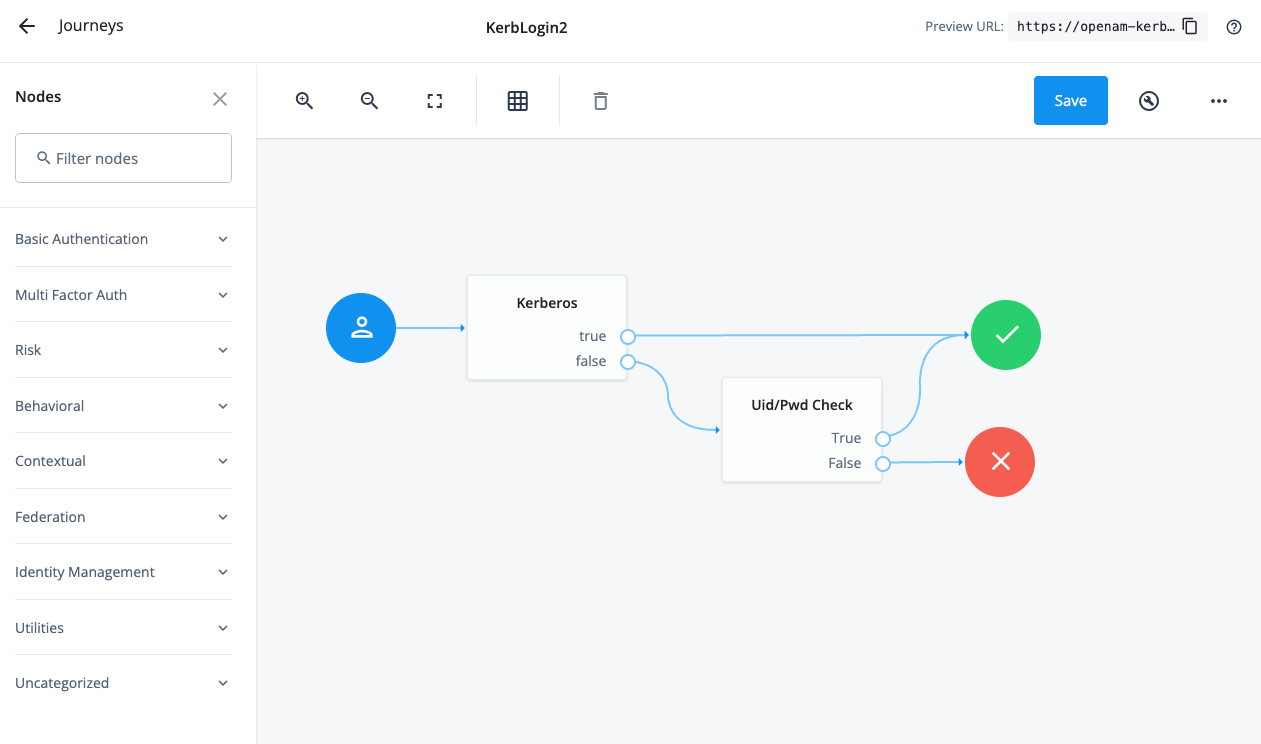
The Kerberos Node is a Script Node Delegate Kerb Login.js that checks
if a Signed JWT exist in the request parameter list. If not, then we
need to redirect the user to IG for Kerberos Authentication. If the
Signed JWT exist, then the node validates the signature, and unpacks the
JWT to get the username, which is placed in the sharedState.
The Uid/Pwd Check is a Inner Tree Node, which calls another journey to gather a uid/pwd to checks against an Identity Cloud Data Decision Node.
One additional point to keep in mind - you can always do pre or post-work in regards to the Kerberos node. For example you could check the IP address of the user before sending that user to IG to perform a Kerberos validation. You wouldn’t want to send the user to the Kerberos IG route if the user is coming from an IP address that wasn’t on the network (they of course wouldn’t have a validate Kerberos Ticket).
And when you return from the Kerberos node, you may want to perform MFA.
Identity Gateway Details
Here is an example of a simple route for our setup - (And here is the
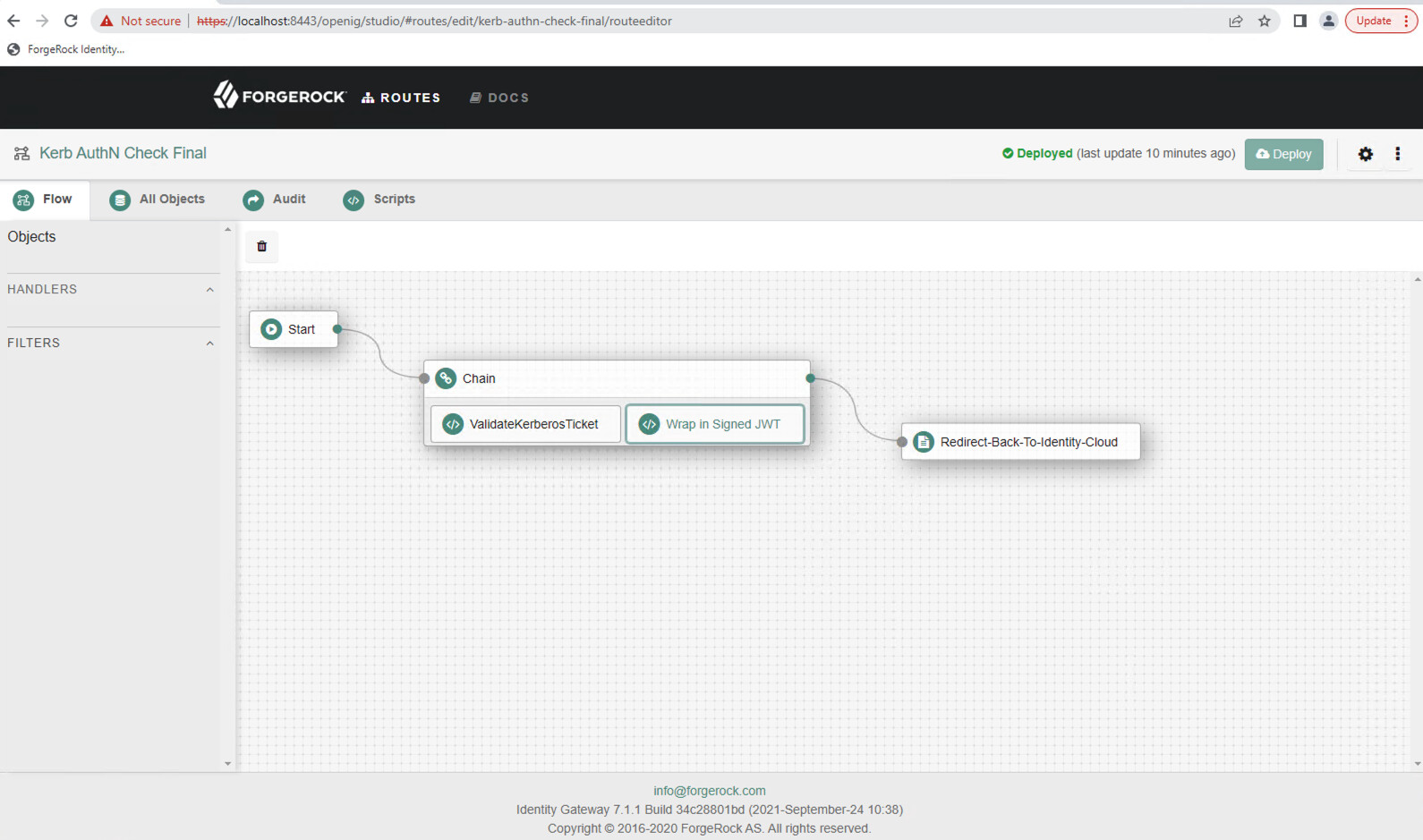
The ValidateKerberosTicket.groovy is a ScriptableFilter that requests
a Kerberos Ticket from the users browser, and validates it. This Groovy
script uses a service account setup in AD. See
Kerberos
Setup.pdf to perform the request and checking of the Kerberos Ticket
for details.
Summary
https://docs.google.com/document/d/1axhYU1_51RFWEt1GoYoLGnlv5GUF3yqP-v1-vfI20C8/edit#heading=h.kfqlzlh9y9ny for details)
The Wrap in Signed JWT (SignJWT.groovy) is a ScriptableFilter that
creates a SignedJWT with the username from the Kerberos Ticket.
The Redirect-Back-To-Identity-Cloud is a StaticResponseHandler that
redirects the user back to Identity Cloud with the SignedJWT as a
parameter in the HTTP POST
Setup
-
Ensure you have a functioning Kerberos environment with Identity Gateway deployed Prerequisite setup (67.7 KB)
-
Create an AD service account and perform the following setspn cmd to allow the service account access to request the users Kerberos Ticket from the browser, as well as validate the Kerberos Ticket. Assuming igsa is the samaccountname for the service account, demoig.server.frdpcloud.org is the FQDN of the Identity Gateway server, the setspn command would be:
setspn -s HTTP/demoig.server.frdpcloud.org igsa -
Generate a new JWK. For testing purposes, you can use an online JSON web key generator, such as https://mkjwk.org/, to generate a key pair in JWK format.
-
Create a Journey similar to the one described above. Source
-
Update the the following variables in the
Delegate Kerb Login.jsScripted Node-
redirectUrl: Should contain the URL to the Identity Gateway Route. -
wksJson: Should contain the newly generated public and private key pair from step 3.
-
-
Create a Route in Identity Gateway similar to the one described above. Source
-
Update the following variables in the
ValidateKerberosTicket.groovyScriptableFilter-
domainUsername: Service account samaccountname generated in step 2 above -
domainUserPassword: Service account password generated in step 2 above -
System.properties['java.security.auth.login.config']: Location of the spengo file generated in step 1 above
-
-
Update the following variables in the
SignedJWT.groovyScriptableFilter-
JWK.parse: This is the public key generated in step 3 above
-
-
Update the
Redirect-Back-To-Identity-CloudStaticResponseHandler:-
HTTP Status: 302 Found -
Headers: Point to your Identity Cloud Kerberos Journey. For examplehttps://openam-kerb-demo.forgeblocks.com/am/XUI/?realm=alpha&authIndexType=service&authIndexValue=KerbLogin2&UsernameJWT=${attributes.SignedJWT}
-
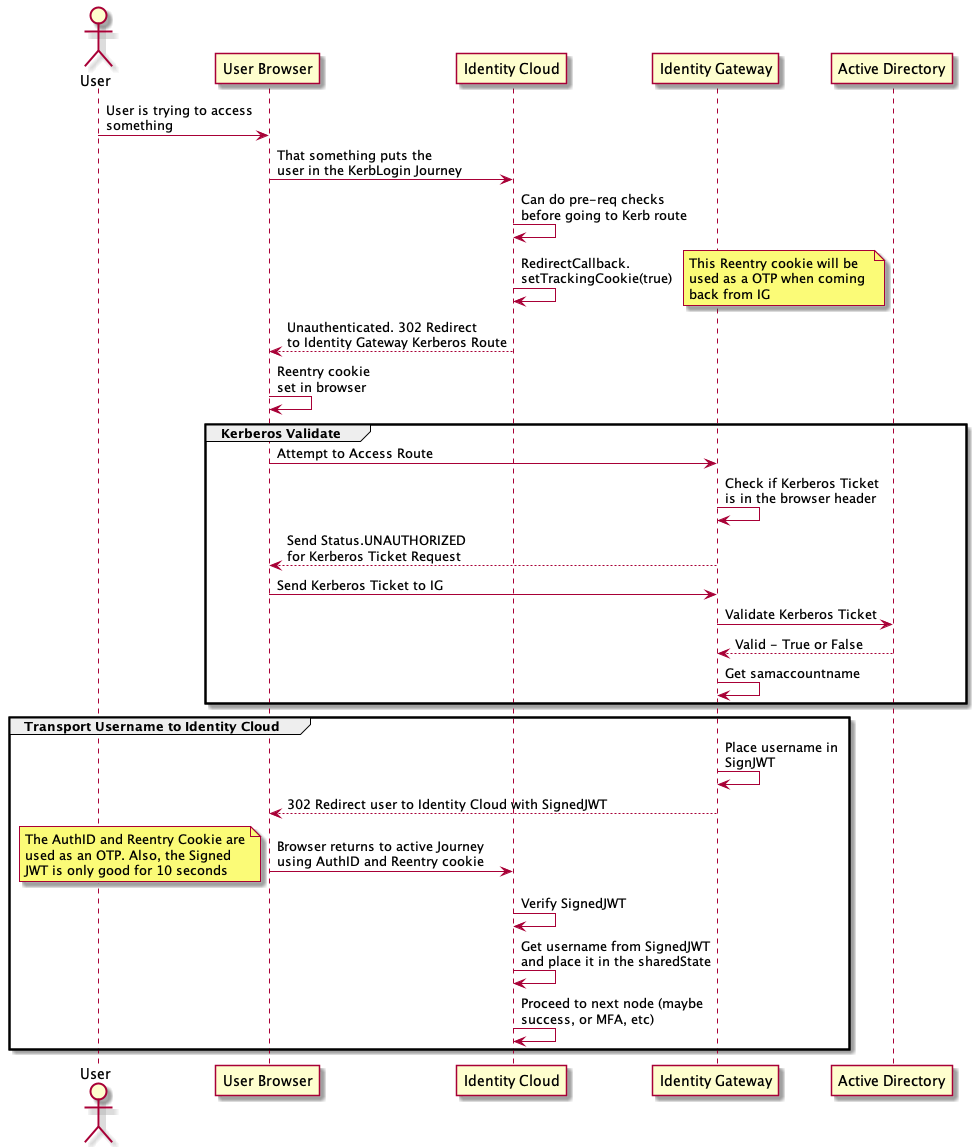
Here is an example sequence diagram of the complete end-to-end interaction: