Use case: Manage authentication journeys through API requests in
Author: |
Lucy Billington |
Created at: |
Apr 2023 |
Updated at: |
May 2023 |
Use case overview
All ForgeRock Identity Cloud’s administrator and end-user capabilities use a REST API framework, which establishes standard APIs for accessing web resources.
The use of REST APIs in Identity Cloud can be demonstrated through applications such as Postman, which facilitates the creation, execution and administration of REST calls. Alternatively, you can use the curl command line utility, included with most operating systems.
For this use case, we’ll show examples of how Postman can be used to query, create, update and delete intelligent access journeys in Identity Cloud.
Managing journeys through the REST API using Postman
ForgeRock provides a preconfigured Identity Cloud Postman collection that includes methods and examples of calls you can make to Identity Cloud for a variety of purposes, including authentication, self-service, identity profiles, managing sessions, debugging, and more.
For this use case, we’ll extend the Identity Cloud Postman collection with requests to:
-
Query all journeys
-
Create a registration journey
-
Query the registration journey
-
Update the registration journey
-
Delete the registration journey
Supporting information on creating journeys using the REST API can be found here: How do I create an authentication journey via REST in Identity Cloud?
Prerequisites
-
Follow the links below for details on how to prepare the provided Identity Cloud Postman collection.
-
For this collection or any new collection you are adding, you’ll need to adjust the Variables tab at the top of the imported collection as necessary.
-
Before you can make any of the REST calls detailed in this article, you will need an access token. See Authenticate to Identity Cloud REST API with access token for further information.
Query all journeys
A GET request to the following URL retrieves all journeys in your
tenant. The response is a JSON payload.
{{amUrl}}/json/realms/root/realms/alpha/realm-config/authentication/authenticationtrees/trees?_fields=_id,description,identityResource,uiConfig,nodes&_prettyPrint=true&_queryFilter=true&accept=application/json, text/javascript, */*; q=0.01Where {{amUrl}} is the Identity Cloud tenant name (configured in the
collection variables).
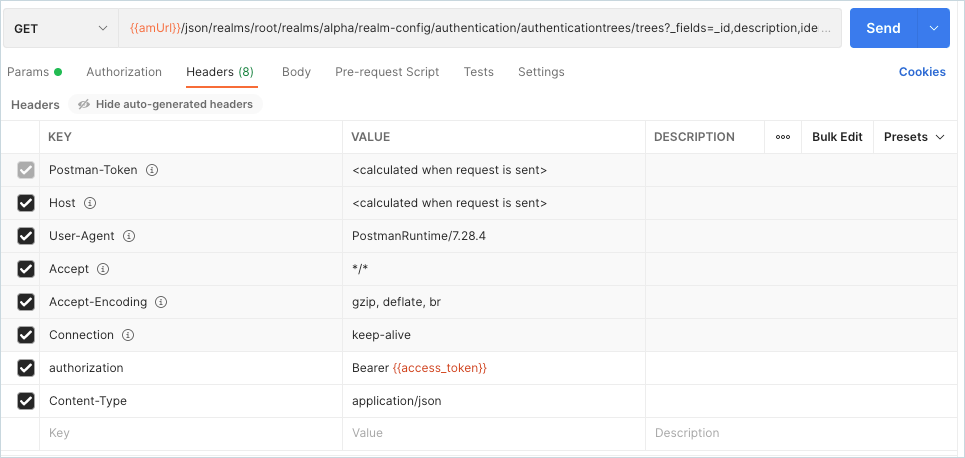
Example output:
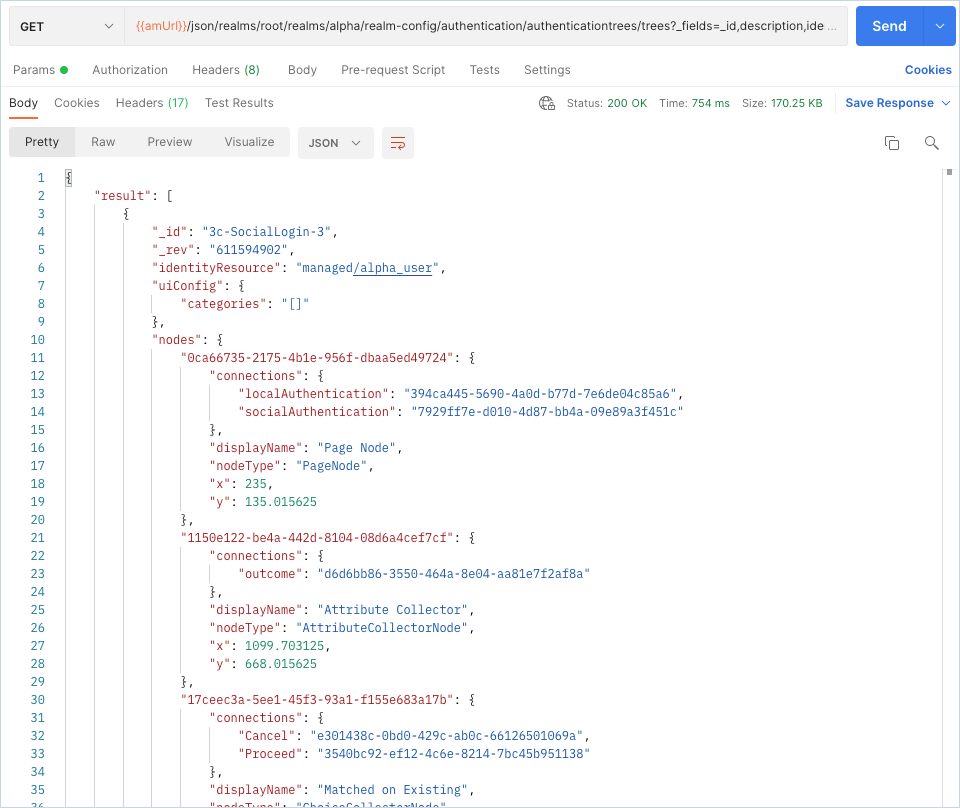
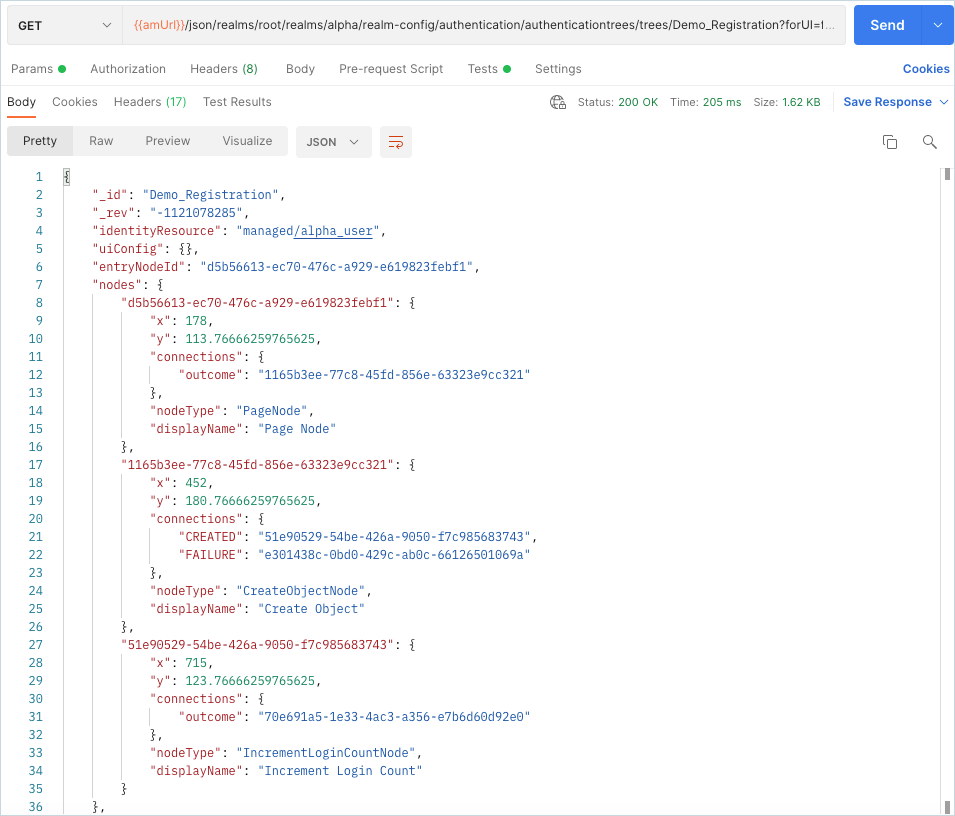
Notice the JSON objects that represent the journeys and the different nodes and their connections.
Create a registration journey
When creating journeys using the REST API, you should be aware of the points outlined in the Overview section of this article: How do I create an authentication journey via REST in Identity Cloud?
For example, a PUT request to the following URL creates a registration
journey called Demo_Registration.
{{amUrl}}/json/realms/root/realms/alpha/realm-config/authentication/authenticationtrees/trees/Demo_RegistrationWhere {{amUrl}} is the Identity Cloud tenant name (configured in the
collection variables).
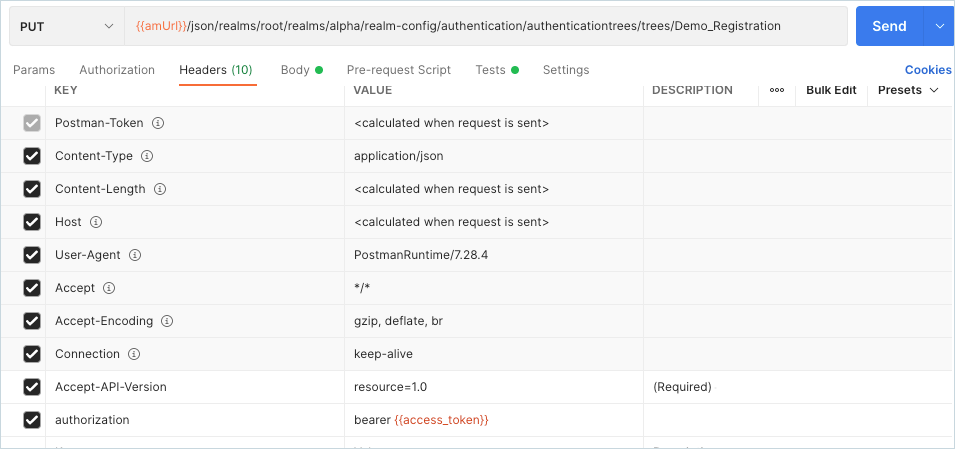
Our example request includes the following JSON payload in the body of the request:
{
 "entryNodeId": "d5b56613-ec70-476c-a929-e619823febf1",
 "_id": "Demo_Registration",
    "identityResource": "managed/alpha_user",
    "nodes": {
        "d5b56613-ec70-476c-a929-e619823febf1": {
            "x": 178,
            "y": 113.76666259765625,
            "connections": {
                "outcome": "1165b3ee-77c8-45fd-856e-63323e9cc321"
            },
            "nodeType": "PageNode",
            "displayName": "Page Node",
            "config": {
                "_id": "d5b56613-ec70-476c-a929-e619823febf1",
                "nodes": [
                    {
                        "_id": "04803df1-a53b-47ba-913a-e4af66995404",
                        "nodeType": "ValidatedUsernameNode",
                        "displayName": "Platform Username"
                    },
                    {
                        "_id": "6deb15fb-a0fc-4a23-b6f4-8810309ae1eb",
                        "nodeType": "ValidatedPasswordNode",
                        "displayName": "Platform Password"
                    },
                    {
                        "_id": "eab79cef-c58f-40fa-99fa-fceea51f5739",
                        "nodeType": "AcceptTermsAndConditionsNode",
                        "displayName": "Accept Terms and Conditions"
                    },
                    {
                        "_id": "e1f34eae-79f1-4779-b9ce-e5061dabb5cc",
                        "nodeType": "AttributeCollectorNode",
                        "displayName": "Attribute Collector"
                    }
                ],
                "pageDescription": {},
                "pageHeader": {},
                "_type": {
                    "_id": "PageNode",
                    "name": "Page Node",
                    "collection": true
                },
                "_outcomes": [
                    {
                        "id": "outcome",
                        "displayName": "Outcome"
                    }
                ]
            }
        },
        "1165b3ee-77c8-45fd-856e-63323e9cc321": {
            "x": 452,
            "y": 180.76666259765625,
            "connections": {
                "CREATED": "51e90529-54be-426a-9050-f7c985683743",
                "FAILURE": "e301438c-0bd0-429c-ab0c-66126501069a"
            },
            "nodeType": "CreateObjectNode",
            "displayName": "Create Object",
            "config": {
                "_id": "1165b3ee-77c8-45fd-856e-63323e9cc321"
            }
        },
        "51e90529-54be-426a-9050-f7c985683743": {
            "x": 715,
            "y": 123.76666259765625,
            "connections": {
                "outcome": "70e691a5-1e33-4ac3-a356-e7b6d60d92e0"
            },
            "nodeType": "IncrementLoginCountNode",
            "displayName": "Increment Login Count",
            "config": {
                "_id": "51e90529-54be-426a-9050-f7c985683743"
            }
        }
    },
    "staticNodes": {
        "startNode": {
            "x": 50,
            "y": 250
        },
        "70e691a5-1e33-4ac3-a356-e7b6d60d92e0": {
            "x": 955,
            "y": 45
        },
        "e301438c-0bd0-429c-ab0c-66126501069a": {
            "x": 1009,
            "y": 291
        }
    }
}
Note the following:
-
The
entryNodeIdproperty is the UUID of the first node in the journey. -
The
identityResourceproperty is the identities that will authenticate using the journey, for example,managed/alpha_user. -
The outcome property specified when creating the journey is the UUID of the next node; this is how you move between the nodes.
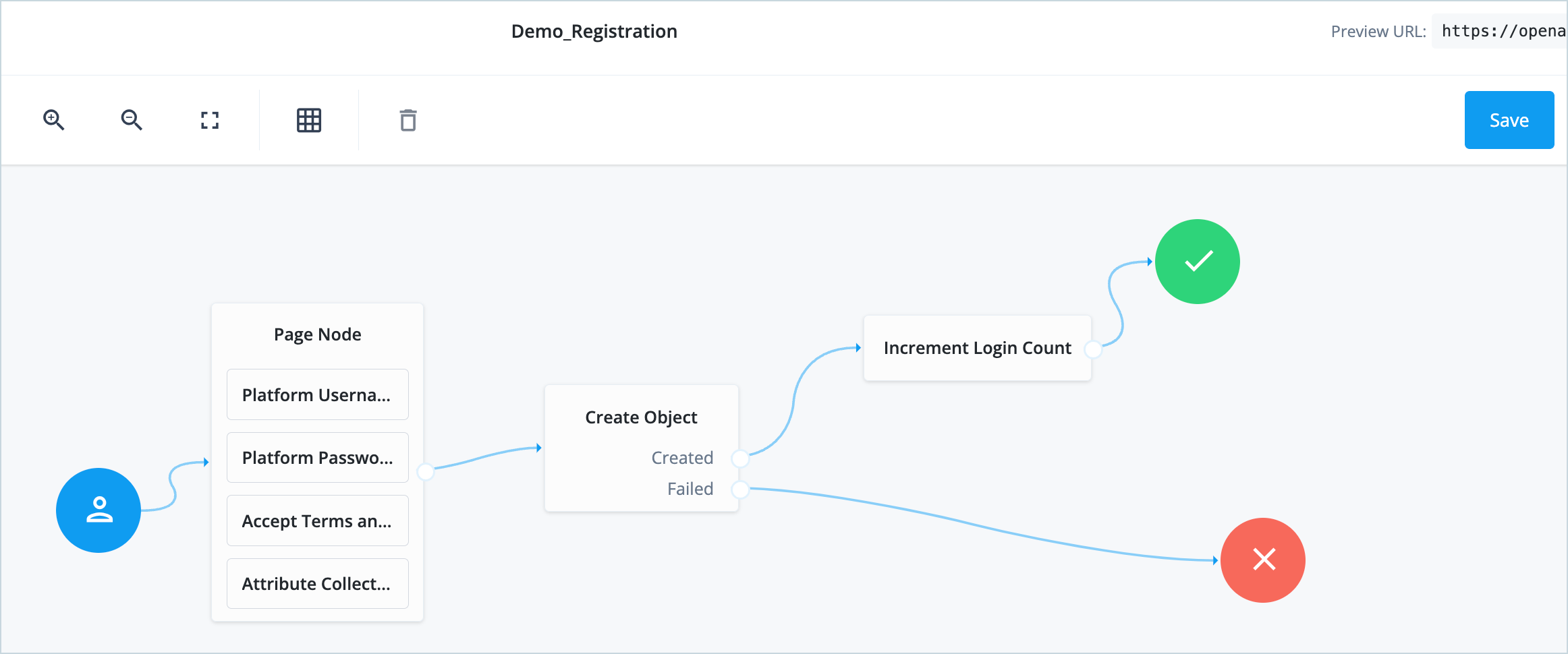
When the request is sent successfully, a new journey called Demo_Regstration is created. You may need to refresh your journey list in the Identity Cloud admin UI to see the new journey.
This basic registration journey requests username, password, required attributes, communication preferences, and consent to Terms & Conditions.
Query the registration journey
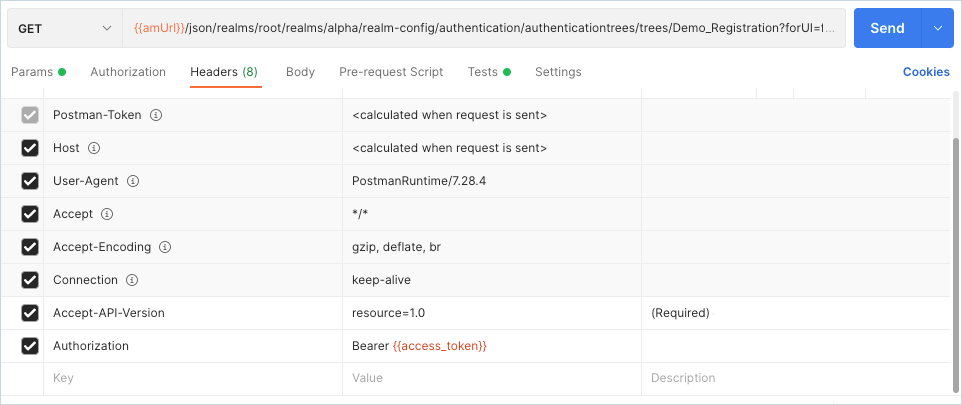
A GET request to the following URL queries the Demo_Regstration
journey to confirm that it still exists.
{{amUrl}}/json/realms/root/realms/alpha/realm-config/authentication/authenticationtrees/trees/Demo_Registration?forUI=falseWhere {{amUrl}} is the Identity Cloud tenant name configured in the
collection variables.
Example output:
Update the registration journey
In this example, we’ll update the Demo_Regstration journey to include an Inner Tree Evaluator node that initiates a progressive profiling step.
NOTE: In our example, an existing journey called ProgressiveProfile already exists in the Identity Cloud tenant.
A PUT request to the following URL replaces the existing
Demo_Regstration journey with a new JSON payload that includes the
Inner Tree Evaluator node.
{{amUrl}}/json/realms/root/realms/alpha/realm-config/authentication/authenticationtrees/trees/Demo_RegistrationWhere {{amUr}} is the Identity Cloud tenant name (configured in the
collection variables).
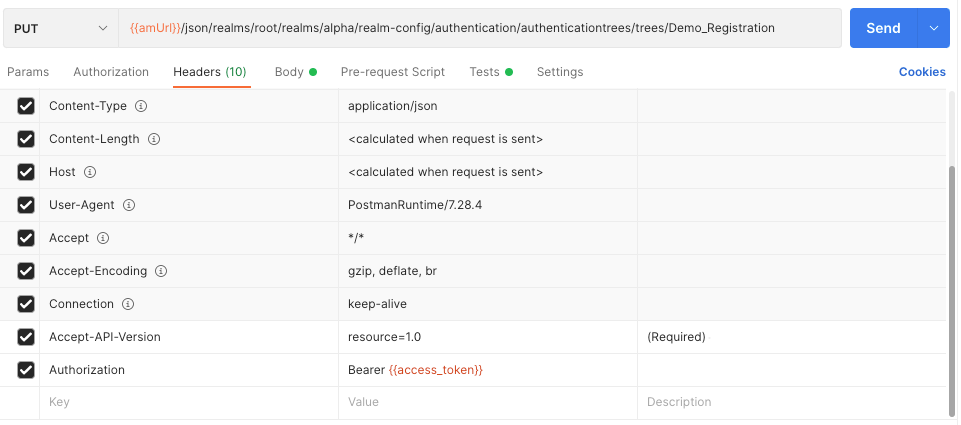
Our example includes the following JSON payload in the body of the request:
{
   "entryNodeId": "d5b56613-ec70-476c-a929-e619823febf1",
   "_id": "Demo_Registration",
   "nodes": {
       "d5b56613-ec70-476c-a929-e619823febf1": {
           "x": 178,
           "y": 113.76666259765625,
           "connections": {
               "outcome": "1165b3ee-77c8-45fd-856e-63323e9cc321"
           },
           "nodeType": "PageNode",
           "displayName": "Page Node",
           "config": {
               "_id": "d5b56613-ec70-476c-a929-e619823febf1",
               "nodes": [
                   {
                       "_id": "04803df1-a53b-47ba-913a-e4af66995404",
                       "nodeType": "ValidatedUsernameNode",
                       "displayName": "Platform Username"
                   },
                   {
                       "_id": "6deb15fb-a0fc-4a23-b6f4-8810309ae1eb",
                       "nodeType": "ValidatedPasswordNode",
                       "displayName": "Platform Password"
                   },
                   {
                       "_id": "eab79cef-c58f-40fa-99fa-fceea51f5739",
                       "nodeType": "AcceptTermsAndConditionsNode",
                       "displayName": "Accept Terms and Conditions"
                   },
                   {
                       "_id": "e1f34eae-79f1-4779-b9ce-e5061dabb5cc",
                       "nodeType": "AttributeCollectorNode",
                       "displayName": "Attribute Collector"
                   }
               ],
               "pageDescription": {},
               "pageHeader": {},
               "_type": {
                   "_id": "PageNode",
                   "name": "Page Node",
                   "collection": true
               },
               "_outcomes": [
                   {
                       "id": "outcome",
                       "displayName": "Outcome"
                   }
               ]
           }
       },
       "1165b3ee-77c8-45fd-856e-63323e9cc321": {
           "x": 383,
           "y": 191.76666259765625,
           "connections": {
               "CREATED": "51e90529-54be-426a-9050-f7c985683743",
               "FAILURE": "e301438c-0bd0-429c-ab0c-66126501069a"
           },
           "nodeType": "CreateObjectNode",
           "displayName": "Create Object",
           "config": {
               "_id": "1165b3ee-77c8-45fd-856e-63323e9cc321",
               "identityResource": "managed/user",
               "_type": {
                   "_id": "CreateObjectNode",
                   "name": "Create Object",
                   "collection": true
               },
               "_outcomes": [
                   {
                       "id": "CREATED",
                       "displayName": "Created"
                   },
                   {
                       "id": "FAILURE",
                       "displayName": "Failed"
                   }
               ]
           }
       },
       "51e90529-54be-426a-9050-f7c985683743": {
           "x": 548,
           "y": 96.76666259765625,
           "connections": {
               "outcome": "8f2bac1f-6573-4fad-b4a3-905be88d434f"
           },
           "nodeType": "IncrementLoginCountNode",
           "displayName": "Increment Login Count",
           "config": {
               "_id": "51e90529-54be-426a-9050-f7c985683743",
               "identityAttribute": "userName",
               "_type": {
                   "_id": "IncrementLoginCountNode",
                   "name": "Increment Login Count",
                   "collection": true
               },
               "_outcomes": [
                   {
                       "id": "outcome",
                       "displayName": "Outcome"
                   }
               ]
           }
       },
       "8f2bac1f-6573-4fad-b4a3-905be88d434f": {
           "x": 774,
           "y": 72.76666259765625,
           "connections": {
               "true": "70e691a5-1e33-4ac3-a356-e7b6d60d92e0",
               "false": "70e691a5-1e33-4ac3-a356-e7b6d60d92e0"
           },
           "nodeType": "InnerTreeEvaluatorNode",
           "displayName": "Inner Tree Evaluator",
           "config": {
               "tree": "ProgressiveProfile"
           }
       }
   },
   "staticNodes": {
       "startNode": {
           "x": 50,
           "y": 250
       },
       "70e691a5-1e33-4ac3-a356-e7b6d60d92e0": {
           "x": 987,
           "y": 92
       },
       "e301438c-0bd0-429c-ab0c-66126501069a": {
           "x": 1009,
           "y": 291
       }
   }
}
Note that the JSON includes a "nodeType": "InnerTreeEvaluatorNode"
with "tree": "ProgressiveProfile".
When the request is sent successfully, the Demo_Registration journey is updated to include the Inner Tree Evaluator node. You may need to refresh your journey list in the Identity Cloud admin UI to view the updated journey.

Delete the registration journey
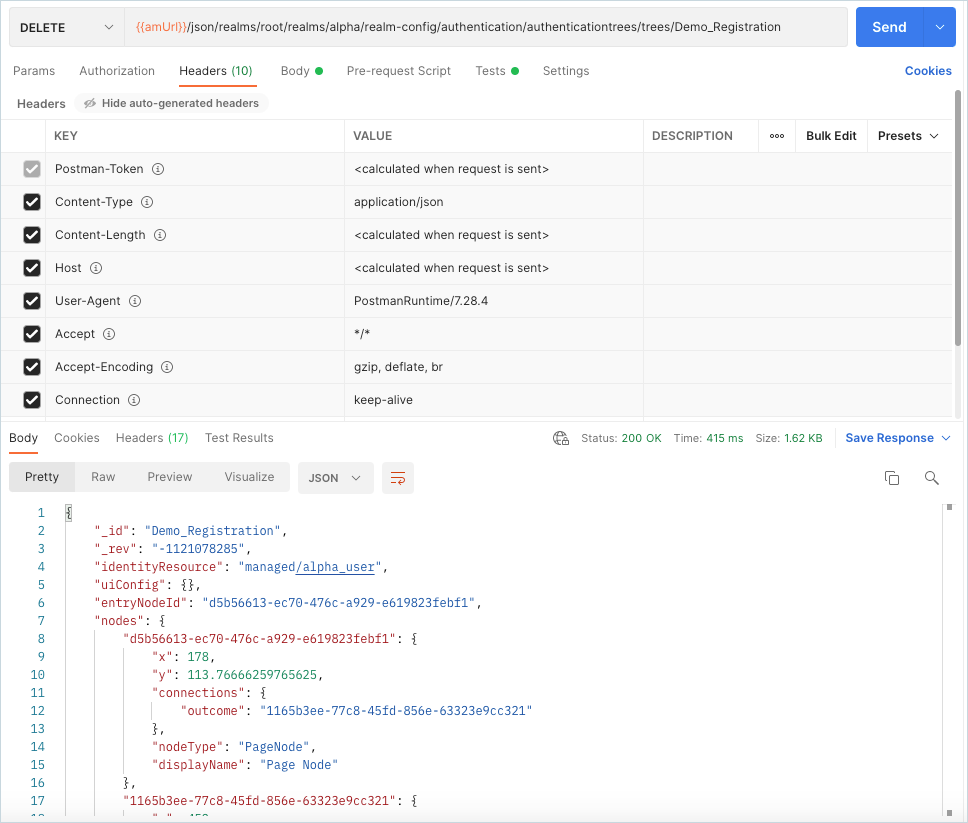
A DELETE request to the following URL deletes the Demo_Registration
journey.
{{amUrl}}/json/realms/root/realms/alpha/realm-config/authentication/authenticationtrees/trees/Demo_RegistrationWhere {{amUrl}} is the Identity Cloud tenant name (configured in the
collection variables).

When the request is sent successfully, the Demo_Registration journey is removed from your Identity Cloud tenant.