How to Count the Total Number of Remote Users in ForgeRock Identity
Author: |
Darinder Shokar |
Created at: |
May 2024 |
Updated at: |
May 2024 |
By Darinder Shokar
Originally posted on
https://medium.com/@darinder.shokar
Introduction
ForgeRock Identity Cloud allows you to connect your tenant to an external data source such as an LDAP server or database. From time to time there is a need to count the total number of users (or objects) in such a datastore.
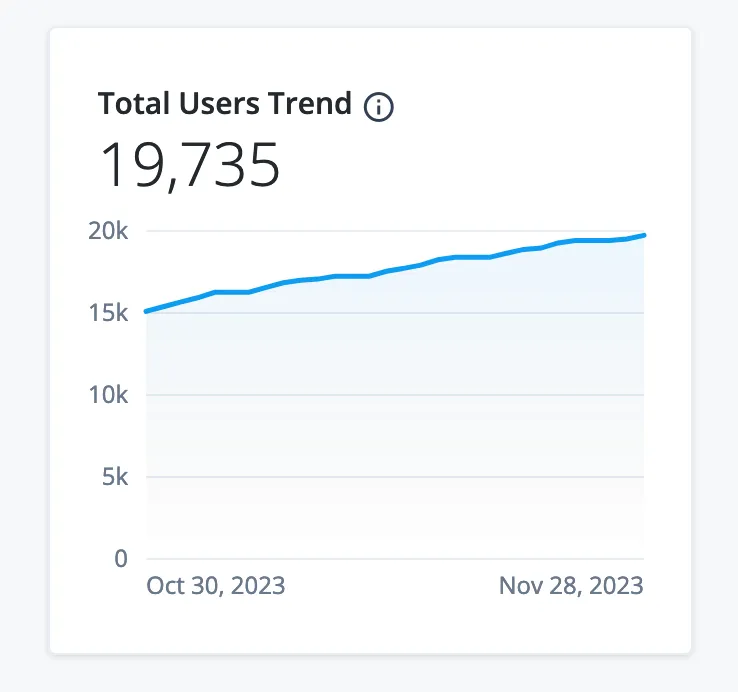
Total User Count
This blog presents a programmatic way to execute a count quickly and
easily in Identity Cloud using the …/system endpoint.
As a pre-requisite, a Remote Connector Server (RCS) needs to be deployed close the datastore and a Connector needs to be configured in ForgeRock Identity Cloud in. See this link for more on this.
The implementation also makes use of paging to ensure the remote datastore is not overwhelmed when there are many millions of users or objects.
Note — some datastores do not support paging, be sure to test in lower environments first.
Scripted Approach
The script is located on Github here.
In order to execute the script either a tenant admin access token or an IDM scoped Service Account access token (see this blog for more on Service Accounts) is required.
In order to execute the script run:
./system_object_count.sh <access_token_here>

e.g.

./system_object_count.sh eyJ0eXAiOiJKV1QiLCJraWQiOiI3UEtESGd3Rnpp.....
The output will look something like this:
********************
********************
Execution cycle: 1
Result count from query: 100000
Total user count: 100000
Continuing - All user records not returned. Current Page Results cookie value is 100000
Request/response execution time: 0 minutes and 13 seconds
Total request/response execution time: 0 minutes and 13 seconds
********************
Execution cycle: 2
Result count from query: 100000
Total user count: 200000
Continuing - All user records not returned. Current Page Results cookie value is 200000
Request/response execution time: 0 minutes and 13 seconds
Total request/response execution time: 0 minutes and 26 seconds
********************
Execution cycle: 3
Result count from query: 100000
Total user count: 300000
Continuing - All user records not returned. Current Page Results cookie value is 300000
Request/response execution time: 0 minutes and 14 seconds
Total request/response execution time: 0 minutes and 40 seconds
********************
Execution cycle: 4
Result count from query: 18562
Total user count: 318562
Continuing - All user records not returned. Current Page Results cookie value is 400000
Request/response execution time: 0 minutes and 3 seconds
Total request/response execution time: 0 minutes and 43 seconds
Script Breakdown
The script defines a number of variables:
-
FQDN — this is the fully qualified domain name of the ForgeRock Identity Cloud tenant. For example
https://openam-mytenant.forgerock.io -
CONNECTOR — the name of the connector defined in Identity Cloud. To check this in the Platform UI > Native Consoles > Identity Management > Configure to menu > Connectors > The name is visible in the UI. In this example it’s
LDAP

Connector Name
-
ACCOUNT_IDENTIFIER — the object type for the account. To check this in UI go to the above location > click the connector > Object Types tab. In this example ACCOUNT_IDENTIFIER should be
account
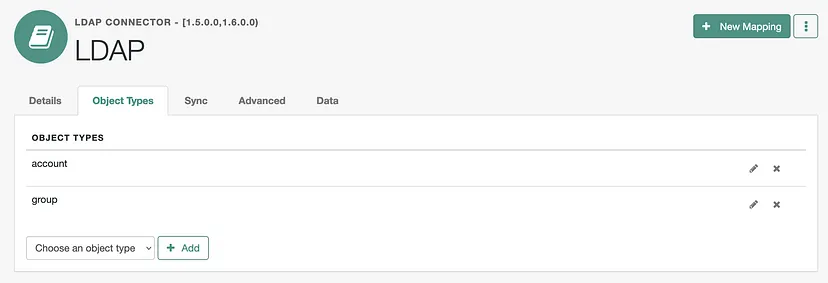
Object Type Account Identifier
The default for a ForgeRock Directory Services connector is account
For databases this is typically ACCOUNT
-
PAGED_RESULTS_COOKIE — the start value for the paged results cookie, which is used to keep track of where the search query has got to. For ForgeRock Directory Services this should be set to
''For databases this is typically a value or0(note without quotes) -
PAGE_SIZE — the number of objects to return from the remote datastore with each query. Default value is 100K, tune down if the remote datastore resource are limited or the dataset is small
-
DEBUG — if set to
truethe HTTP response for each call is output. Default value isfalse
The script then executes in a while loop, counting the number of objects
per execution cycle, the total number of cumulative objects, and the
response time for each call until the PAGED_RESULTS_COOKIE returns as
null
Note you can hit Ctrl + C to cancel the script at any time if needed.
Conclusion
There you have it, an easy programatic approach for counting the total numbers of users and objects from a remote datastore in ForgeRock Identity Cloud.
Thanks for reading!
+


A Scripted Approach for Creating and Using Service Accounts in ForgeRock…
A scripted approach for creating and using the new Service Accounts feature in ForgeRock Identity Cloud
Reading time: 4 min read
Problem statement Most database technologies (Cloud DB as a Service offerings, traditional DBs, LDAP services, etc.) typically run in a single primary mode, with multiple secondary nodes to ensure high availability. The main rationale is it’s the only surefire way to ensure data consistency, and integrity is maintained. If an active topology was enabled, replication delay (the amount of time it takes for a data WRITE operation on one node to propagate to a peer) may cause the following to occu…
 Use
case: Use email address as the username in ForgeRock Identity Cloud
[.badge-category__name#Setup#]
Use
case: Use email address as the username in ForgeRock Identity Cloud
[.badge-category__name#Setup#]
Use case overview Many organizations, particularly those in the Consumer Identity & Access Management (CIAM) space, want to enable a slick low friction experience for their customers. One easy way to achieve this is by using the email address as the username, rather than customers having to remember words or a set of characters. Steps to achieve this use case A key feature and differentiator of ForgeRock Identity Cloud is its flexibility. You can take advantage of this flexibility to configur…
Immutable
Deployment Pattern for AM Configuration Without File- Based
Configuration
[.badge-category__name#Architecture#]
[image] Introduction The standard production grade deployment pattern for ForgeRock Access Management (AM) is to use replicated sets of configuration directory server instances to store all of AM’s configurations. The deployment pattern has worked well in the past, but is less suited to the immutable, DevOps-enabled environments of today. This article presents an alternative view of how an immutable deployment pattern could be applied to AM in lieu of the upcoming, full file-based configura…
Immutable
Deployment Pattern for ForgeRock Access Management (AM) Configuration
without File Based Configuration (FBC)
[.badge-category__name#Architecture#]
Introduction The standard Production Grade deployment pattern for ForgeRock AM is to use replicated sets of Configuration Directory Server instances to store all of AM’s configuration. The deployment pattern has worked well in the past, but is less suited to the immutable, DevOps enabled environments of today. This blog presents an alternative view of how an immutable deployment pattern could be applied to AM in lieu of the upcoming full File Based Configuration (FBC) for AM in version 7.0 of…
IDM
Deployment Patterns: Centralized Repo- Based vs. Immutable File-Based
[.badge-category__name#Architecture#]
Introduction I recently blogged about how customers can architect ForgeRock Access Management to support an immutable, DevOps style deployment pattern — see link. In this post, we’ll take a look at how to do this for ForgeRock Identity Management (IDM). IDM is a modern OSGi-based application, with its configuration stored as a set of JSON files. This lends itself well to either a centralized repository- (repo) based deployment pattern, or a file-based immutable pattern. This article explores …
A
Script for Executing the OAuth 2.0 Authorization Code Flow with PKCE in
AM [.badge-category__name#Setup#]
Introduction I often meet customers who want to quickly understand how the OAuth2 Authorization Code grant type works, how Proof Key for Code Exchange (PKCE) works, and how they can execute the flows programatically to understand how it all hangs together. This blog provides a sample script to execute the OAuth2 Authorization Code grant flow, along with support for PKCE using cURL. What is the OAuth2 Authorization Code Grant Flow? The Authorization Code grant is a two-step interactive proces…
Introduction ForgeRock Identity Cloud is revolutionizing the way businesses, consumers, and customers execute on their IAM strategy. Our Identity Cloud customers repeat three common feedback themes over and over again: Quicker time to value: Customers no longer have to worry about the build, run, operate and feed process of standing up an IAM system—ForgeRock Identity Cloud is managed by the people who build the underlying software; us (ForgeRock). Introduction of cool new stuff quicker and …
Integrating IG with Identity
Cloud
[.badge-category__name#Integrations#]
Introduction It’s an exciting time here at ForgeRock. The ForgeRock Identity Cloud helps customers rapidly embrace next generation IAM, and quickly realize a return on their investment. For more on what this service offers, check out the following links: ForgeRock Identity Cloud overview here. ForgeRock Identity Cloud documentation here. In this exciting world, helping customers quickly and easily integrate with the ForgeRock Identity Cloud platform is critical. In this article, we’ll show yo…
Locking
Out a User and Deleting All of Their Active Tokens in AM
[.badge-category__name#Maintenance#]
Introduction Customers often ask, “We have a business security requirement where we want to not only lock a given user out of the system, but also find and delete all SSO tokens they have created using the AM API. How do we do that?” This article shows you how to do this using the delete_tokens.sh script ;) In order to achieve this, we’ll be making using of the following AM endpoints: …/authenticate: Endpoint for authenticating users. …/users: Endpoint for getting and setting user profile a…